Epson Home Cinema 5040UB 3LCD Home Theater Projector Review
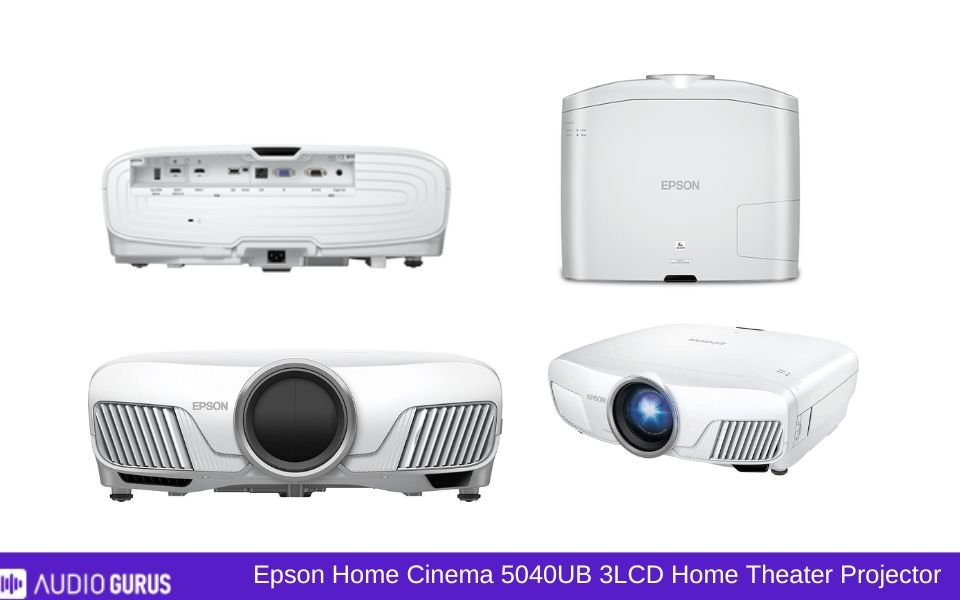
The Epson Home Cinema 5040UB is great for gamers and movie fans who want the best picture quality and have a room set aside for a home theatre. It is meant for medium-sized to big spaces where you can adjust the lighting and create adequate distance for a good throw. This projector suits you if you want immersive graphics and don't mind a little tweaking to get the settings exactly perfect. It is unsuitable, however, for tiny flats or those seeking a portable, plug-and-play answer. This is a large machine for serious watching.
Our Verdict
For movie buffs and gamers with a dedicated room, the Epson Home Cinema 5040UB is a great option as it shines in presenting breathtaking images. Its vivid hues, great brightness, and adaptable lens changes really stand out. Its weight, lack of clever design, and obvious fan noise, however, might turn off some purchasers. For individuals who value image quality above convenience and are ready to spend time and money building a suitable home theatre configuration, it is perfect. While there are more sensible choices for casual users or those in smaller areas, few can replicate the cinematic experience the 5040UB offers.
PROS
- Outstanding picture quality.
- Vibrant, accurate colors.
- Excellent brightness levels.
- Motorized lens adjustments.
- Backlit, user-friendly remote.
- Versatile connectivity options.
- Works well with various devices.
- Immersive cinematic experience.
CONS
- Bulky and heavy design.
- No built-in smart features.
- Noticeable fan noise.
GENERAL
| Projector Type | 3LCD |
|---|---|
| Screen Size | 50" to 300" |
| Brightness | 2,500 lumens |
| Contrast | 1,000,000:1 |
| Resolution | Native 1080p (1920 x 1080) |
| Throw Ratio | 1.35 – 2.84 |
IMAGE QUALITY
| Resolution | 1920-1080 (Full HD) |
|---|---|
| Brightness | 2000-4000 lumens |
| Contrast | 100000+: 1 |
| Aspect Ratio | 16:9 |
| Pre-Calibration Color Accuracy | No |
| Post-Calibration Color Accuracy | No |
| Color Gamut | DCI-P3 |
| Picture Mode | Bright (or Dynamic) , Cinema (or Movie) , Nature , D. Cinema , 3D Mode |
| Picture-in-Picture | N/A |
PROJECTION TECHNOLOGY
| Illumination Technology | Lamp (Bulb) |
|---|---|
| Display Technology | LCD |
| Geometric Correction | Yes |
| Edge Blending | N/A |
| DICOM | N/A |
| Frame Interpolation | Yes |
| Anamorphic Ready | Yes |
THROW DISTANCE AND SCREEN SIZE
| Throw Ratio | |
|---|---|
| Screen Size Range | 50" – 300" |
| Projection Distance | 10.3 feet for a 100" screen |
| Optional Lenses | N/A |
| Vertical Lens Shift | Yes |
| Horizontal Lens Shift | Yes |
| Lens Memory | Yes |
| Zoom Ratio | 2.1x |
| Power Zoom | Yes |
| Power Focus | Yes |
| 24/7 Duty Cycle | N/A |
THROW DISTANCE AND SCREEN SIZE
| Throw Ratio | 1.35 – 2.84 |
|---|---|
| Screen Size Range | 50" – 300" |
| Projection Distance | 10.3 feet for a 100" screen |
| Optional Lenses | No |
| Vertical Lens Shift | ±96.3% |
| Horizontal Lens Shift | ±47.1% |
| Lens Memory | Yes |
| Zoom Ratio | 2.1x |
| Power Zoom | Yes |
| Power Focus | Yes |
SMART FEATURES
| Wireless Screen Mirroring | Miracast , AirPlay , Chromecast , Wi-Fi Direct , DLNA , ScreenShare , Intel WiDi (Wireless Display) , Roku Screen Mirroring , AnyCast , Samsung Smart View , Amazon Fire TV Screen Mirroring |
|---|---|
| Wireless Casting | Chromecast , AirPlay , Miracast , Wi-Fi Direct , DLNA , Google Cast , Apple TV , Roku Casting , Amazon Fire TV Stick , AnyCast , Intel WiDi (Wireless Display) , Samsung Smart View , Xiaomi Mi TV Stick , Android TV |
| Streaming Apps Built-in | Yes |
| Voice Control | Amazon Alexa , Google Assistant , Apple Siri , Bixby (Samsung) , Cortana (Microsoft) |
| Smart Calibration | Yes |
| Auto Keystone | Yes |
| Smart OS | Yes |
| Automatic Lens Cover | Yes |
| Ambient Light Sensor | Yes |
| Dynamic Image Adjustment ( | Yes |
| User Profiles/Personalized Settings | Yes |
| Crestron RoomView | Yes |
| Close-Captioning | Yes |
| Parental Controls | Yes |
| Customizable Home Screen | Yes |
| CEDIA | Yes |
AUDIO
| Built-in Speakers | N/A |
|---|---|
| Audio Power | No |
| Speaker Type | No |
| Sound Modes | No |
| Dolby Audio Support | No |
| Dolby Digital | Yes |
| Dolby Digital Plus | Yes |
| Dolby Atmos | Yes |
| DTS Audio Support | Yes |
| DTS-HD Master Audio | Yes |
| Audio Formats Supported | MP3 , WAV , AAC , M4A , FLAC , OGG , WMA |
| Audio Enhancements | Volume Normalization , Bass Boost , Equalizer Setting , Sound Mode |
| Auto Audio Sync | Yes |
| Dynamic Range Compression | Yes |
| Loudness Equalization | Yes |
PERFORMANCE
| Input Lag | < 30ms , < 50ms , < 100ms |
|---|---|
| Refresh Rate | 60Hz , 120Hz , 144Hz , 50Hz , 100Hz , VRR |
| Frame Rate | 24Hz , 30Hz , 60Hz , 120Hz , 144Hz , VRR |
| Eco Mode | Yes |
| Full Power Mode | Yes |
| Standby Mode | Yes |
| Manual Keystone Adjustment | Yes |
| Auto Keystone | Yes |
| 4-Point Keystone | Yes |
| Keystone Vertical (Keystone Vert) | Yes |
| Keystone Vertical + Horizontal (Keystone V+H) | Yes |
CONNECTIVITY OPTIONS
| Bluetooth | N/A |
|---|---|
| Bluetooth Audio Support | N/A |
| HDMI | Yes |
| HDMI (MHL) | N/A |
| HDMI (HDCP 2.2) | Yes |
| HDMI (HDCP 2.3) | N/A |
| HDMI 2.1 | N/A |
| USB-C | N/A |
| USB-A | Yes |
| VGA | Yes |
| USB Media Player | Yes |
| Ethernet | Yes |
| DVI | N/A |
| SD Card Slot | N/A |
| Optical Audio Output | N/A |
| Wi-Fi | Yes |
| Wi-Fi Direct | Yes |
| Wi-Fi Connectivity | Yes |
| RS232 (Control Port) | Yes |
| 3.5mm Audio Out | Yes |
| 3.5mm Audio In | Yes |
| Multi-Room Audio Support | N/A |
| RCA Composite Video | Yes |
| Component Video (YPbPr) | Yes |
| S-Video | Yes |
| 12V Trigger | Yes |
| Microphone Input | N/A |
| HDBase T | N/A |
| 3-RCA Component | Yes |
| 3-BNC Component | N/A |
| 5-BNC RGBHV, Comp | N/A |
| Microphone Input | N/A |
BUILD
| Screen Size | 300.99 |
|---|---|
| Dimension | 20.5" x 17.7" x 7.6" |
| Weight | 24.3 Pounds |
| Lamp Life | Normal Mode: 3,500 hours Eco Mode: 5,000 hours |
| Cooling System | Yes |
| Dust-Proof Design | N/A |
| Shock Resistance | N/A |
| High MTBF | N/A |
| Warranty | 2-year |
RATING:
| Video | 4.43 |
|---|---|
| Connectivity | 4 |
| Audio | 3.41 |
Design
The Epson Home Cinema 5040UB is not small or subtle. It’s a big, bulky unit, and you’ll notice it the moment you take it out of the box. For some, this heft makes it feel like a premium device; it’s sturdy and has a sense of quality. The white and black finish blends into most home setups, but it’s not going to disappear into the background entirely. If you’re planning to ceiling-mount it, be prepared for a bit of effort—this isn’t something you’ll casually move around.
One thing that stands out is the lens. The motorized lens with its adjustment features—zoom, focus, and lens shift—is a lifesaver. I’ve set up other projectors where you have to fiddle manually, and it’s a pain. Here, you can make changes using the remote, which is great for fine-tuning. The remote itself is another highlight. It’s backlit, simple, and well-organized, making it easy to use in a dark room.
On the downside, the size can be a problem for smaller spaces. It’s not just the projector; you’ll also need to consider the throw distance. This isn’t a short-throw projector, so you’ll need a decent amount of space to get the large screen sizes it’s capable of. Additionally, the fan noise can be noticeable, especially during quiet scenes. It’s not a deal-breaker, but it’s something you’ll notice if you’re sensitive to background sounds.
Connectivity
The Epson 5040UB offers a solid range of connectivity options. It’s got two HDMI ports, one of which supports HDCP 2.2 for 4K content. This means you can plug in a streaming stick, a gaming console, or a Blu-ray player without any issues. I used a Chromecast Ultra and an Xbox Series X, and switching between them was seamless. The projector detected the inputs quickly, and I didn’t experience any lag or signal drops.
It also has USB ports, which are handy for firmware updates or powering devices like the aforementioned streaming stick. However, there’s no native Wi-Fi or Bluetooth, which is a missed opportunity. In 2025, relying on external devices for wireless streaming feels outdated. I used a third-party HDMI adapter to cast directly from my phone, which worked fine but added clutter.
A common complaint is the lack of built-in smart functionality. Many budget projectors these days come with Android TV or similar systems baked in, so the Epson feels behind in this area. On the bright side, its compatibility with a wide range of devices makes it versatile. Just be ready to invest in extra gadgets if you want wireless streaming or advanced smart features.
Performance
Here’s where the Epson 5040UB shines. The picture quality is outstanding. I tested it with a mix of 4K movies, HDR content, and regular 1080p TV shows, and the results were consistently impressive. The colors pop without being oversaturated, thanks to the 3LCD technology. Watching something like "Avatar" or "Blade Runner 2049" felt immersive, with deep blacks and vibrant highlights.
The brightness levels are a big plus. Rated at 2,500 lumens, it’s bright enough for daytime use if you’ve got curtains drawn. In a dark room, it’s a completely different beast. The HDR performance stands out as one of the best in its class, with clear details in both shadowy and bright scenes. However, the HDR implementation isn’t perfect. There were moments where the highlights felt a bit blown out, especially during very bright scenes.
Gaming on this projector was a mixed bag. The image quality and large-screen real estate made games like "The Legend of Zelda: Tears of the Kingdom" look incredible, but the input lag might not satisfy competitive gamers. For casual single-player games, it’s fine, but for fast-paced shooters or fighting games, you’ll probably notice the delay.
The fan noise mentioned earlier becomes more noticeable during high-performance modes like HDR playback or gaming. If you’re sitting close to the projector, it might be distracting, but from a normal viewing distance, it’s manageable. Also, the bulb life is decent but not exceptional. Epson claims around 4,000 hours in normal mode and 5,000 in eco mode. If you’re a heavy user, you’ll need to factor in the cost of replacement bulbs down the line.
Where and When to Use
This projector is best suited for dedicated home theater setups. If you have a large room and can control the lighting, it’s fantastic. Watching movies on a 100-inch screen with this level of quality feels like being in a mini theater. It’s also great for hosting watch parties or game nights. I’ve had friends over to watch sports, and everyone was blown away by the clarity and size of the image.
It’s less ideal for smaller apartments or multi-purpose rooms. The size, throw distance, and lack of built-in smart features make it a bit cumbersome for casual or on-the-go use. It’s also not the best choice if you’re looking for a portable projector.
Compatible Devices
As mentioned earlier, this projector plays well with a variety of devices. I tested it with a Roku Streaming Stick, an Apple TV, a PS5, and a laptop. All worked without a hitch. The HDMI ports handle 4K content beautifully, and the USB port’s ability to power streaming sticks is a nice touch.
However, the lack of wireless connectivity limits its compatibility. For example, if you want to mirror your phone or tablet screen, you’ll need to use an adapter or a streaming device. It’s not a huge issue, but it adds a layer of complexity that some users might find frustrating.
Ease of Use
Setting up the Epson 5040UB is straightforward if you’ve got the space for it. The motorized lens adjustments make fine-tuning easy, and the on-screen menus are intuitive. The remote’s backlight is a small but thoughtful feature that makes a big difference in dark rooms. I didn’t need to consult the manual much, which is always a good sign.
That said, it’s not plug-and-play. You’ll need to spend some time adjusting the settings to get the best picture quality. The default settings are decent, but tweaking the color, brightness, and contrast can make a noticeable difference. Also, the lack of built-in smart features means you’ll be juggling multiple remotes unless you consolidate everything into a universal remote.
Cost
The Epson 5040UB isn’t cheap. It’s priced in the mid-to-high range for home theater projectors, and you’re paying for the performance. For most people, it’s worth the investment if you’re serious about home entertainment. The picture quality and versatility justify the cost.
However, the lack of modern features like built-in Wi-Fi and Bluetooth feels like a drawback at this price point. You’ll also need to budget for replacement bulbs, which can be pricey. If you’re looking for a more all-in-one solution, there are cheaper options with smart features built-in, but they won’t match the 5040UB’s picture quality.
ADVANCE COMPARE ENGINE
Select Two Audio / Video System for Detailed Comparison
ADVANCE SEARCH ENGINE
Find Your Sound System by Any Desire Specification


