BenQ TK800 4K Projector Review
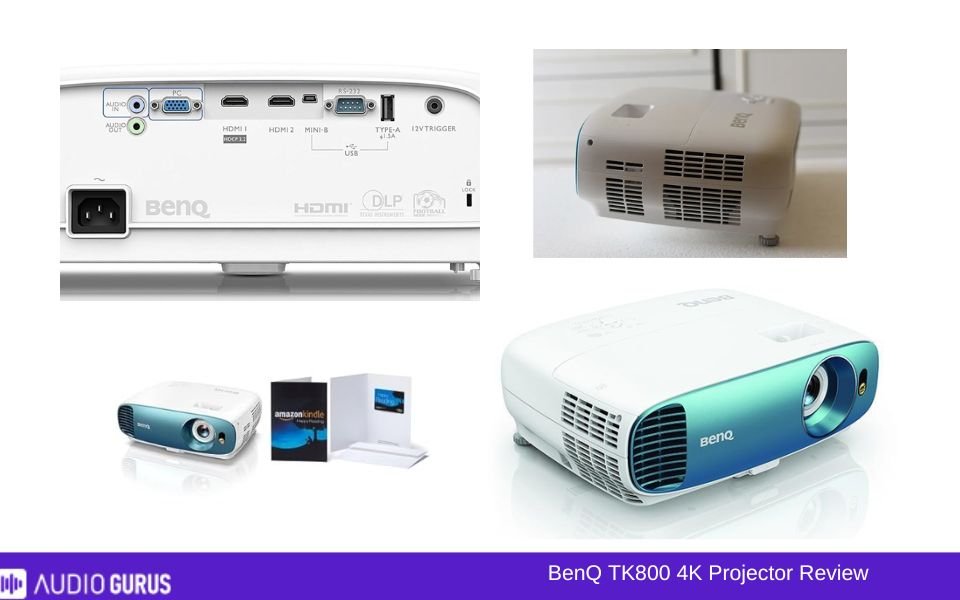
The BenQ TK800 is a 4K projector that promises a high-quality viewing experience, and I got the chance to use it for a few months in different settings. If you’re someone who loves movie nights, sports events, or casual gaming, and you have a medium to large-sized living room or backyard, this might be the projector for you. It’s bright, easy to set up, and delivers stunning visuals.
Our Verdict
The BenQ TK800 is a solid 4K projector with a lot going for it—vivid visuals, portability, and ease of setup. It’s great for occasional use, especially in outdoor or well-lit environments. However, it’s not perfect. The lack of wireless connectivity and average contrast hold it back from being exceptional. For the price, it’s a good pick, but it’s not for everyone. If you’re someone who can work around its quirks, it’ll serve you well. Otherwise, consider what features matter most to you before diving in.
PROS
-
Bright 3000 lumens display.
-
Stunning 4K resolution quality.
-
Compact and portable design.
-
Easy and quick setup.
-
Great for outdoor viewing.
-
Compatible with many devices.
-
Vivid, colorful image output.
-
Keystone correction is handy.
CONS
-
Noticeable input lag.
-
Average contrast in dark scenes.
-
No wireless connectivity options.
GENERAL
| Projector Type | DLP |
|---|---|
| Screen Size | 60" to 200" |
| Brightness | 3000 ANSI Lumens |
| Contrast | 10,000:1 |
| Resolution | 4K UHD (3840 x 2160) |
| Throw Ratio | 1.47 - 1.76 |
IMAGE QUALITY
| Resolution | 4K 3840x2160 (UHD) |
|---|---|
| Brightness | 2000-4000 lumens |
| Contrast | 10000-20000: 1 |
| Aspect Ratio | 16:9 |
| Pre-Calibration Color Accuracy | No |
| Post-Calibration Color Accuracy | No |
| Color Gamut | Rec. 709 Coverage: 96% |
| Picture Mode | Bright (or Dynamic) , Cinema (or Movie) , Vivid , Sports , HDR , User (Custom) , 3D Mode |
| Picture-in-Picture |
PROJECTION TECHNOLOGY
| Illumination Technology | Lamp (Bulb) |
|---|---|
| Display Technology | DLP |
| Geometric Correction | Yes |
| Edge Blending | N/A |
| DICOM | N/A |
| Frame Interpolation | N/A |
| Anamorphic Ready | N/A |
THROW DISTANCE AND SCREEN SIZE
| Throw Ratio | Standard Throw |
|---|---|
| Screen Size Range | 60” to 200” |
| Projection Distance | 3.25 meters |
| Optional Lenses | N/A |
| Vertical Lens Shift | N/A |
| Horizontal Lens Shift | N/A |
| Lens Memory | N/A |
| Zoom Ratio | 1.2x |
| Power Zoom | N/A |
| Power Focus | N/A |
| 24/7 Duty Cycle | N/A |
THROW DISTANCE AND SCREEN SIZE
| Throw Ratio | 1.47 - 1.76 |
|---|---|
| Screen Size Range | 60” to 200” |
| Projection Distance | 3.25 meters |
| Optional Lenses | No |
| Vertical Lens Shift | No |
| Horizontal Lens Shift | No |
| Lens Memory | N/A |
| Zoom Ratio | 1.2x |
| Power Zoom | N/A |
| Power Focus | N/A |
SMART FEATURES
| Wireless Screen Mirroring | |
|---|---|
| Wireless Casting | |
| Streaming Apps Built-in | no |
| Voice Control | |
| Smart Calibration | N/A |
| Auto Keystone | Yes |
| Smart OS | N/A |
| Automatic Lens Cover | N/A |
| Ambient Light Sensor | N/A |
| Dynamic Image Adjustment ( | N/A |
| User Profiles/Personalized Settings | Yes |
| Crestron RoomView | N/A |
| Close-Captioning | N/A |
| Parental Controls | N/A |
| Customizable Home Screen | N/A |
| CEDIA | N/A |
AUDIO
| Built-in Speakers | Yes |
|---|---|
| Audio Power | 5W |
| Speaker Type | Chamber speaker |
| Sound Modes | No |
| Dolby Audio Support | No |
| Dolby Digital | N/A |
| Dolby Digital Plus | N/A |
| Dolby Atmos | N/A |
| DTS Audio Support | N/A |
| DTS-HD Master Audio | N/A |
| Audio Formats Supported | |
| Audio Enhancements | |
| Auto Audio Sync | N/A |
| Dynamic Range Compression | N/A |
| Loudness Equalization | N/A |
PERFORMANCE
| Input Lag | < 50ms |
|---|---|
| Refresh Rate | |
| Frame Rate | |
| Eco Mode | Yes |
| Full Power Mode | Yes |
| Standby Mode | Yes |
| Manual Keystone Adjustment | Yes |
| Auto Keystone | Yes |
| 4-Point Keystone | N/A |
| Keystone Vertical (Keystone Vert) | Yes |
| Keystone Vertical + Horizontal (Keystone V+H) | N/A |
CONNECTIVITY OPTIONS
| Bluetooth | N/A |
|---|---|
| Bluetooth Audio Support | N/A |
| HDMI | Yes |
| HDMI (MHL) | N/A |
| HDMI (HDCP 2.2) | Yes |
| HDMI (HDCP 2.3) | N/A |
| HDMI 2.1 | N/A |
| USB-C | N/A |
| USB-A | Yes |
| VGA | Yes |
| USB Media Player | N/A |
| Ethernet | N/A |
| DVI | N/A |
| SD Card Slot | N/A |
| Optical Audio Output | N/A |
| Wi-Fi | N/A |
| Wi-Fi Direct | N/A |
| Wi-Fi Connectivity | N/A |
| RS232 (Control Port) | Yes |
| 3.5mm Audio Out | Yes |
| 3.5mm Audio In | Yes |
| Multi-Room Audio Support | N/A |
| RCA Composite Video | N/A |
| Component Video (YPbPr) | N/A |
| S-Video | N/A |
| 12V Trigger | Yes |
| Microphone Input | N/A |
| HDBase T | N/A |
| 3-RCA Component | N/A |
| 3-BNC Component | N/A |
| 5-BNC RGBHV, Comp | N/A |
| Microphone Input | N/A |
BUILD
| Screen Size | 201.13 |
|---|---|
| Dimension | 5.31" x 13.90" x 10.71" |
| Weight | 4.2 kg |
| Lamp Life | Normal 4000 hours Economic 10000 hours SmartEco 8000 hours |
| Cooling System | Yes |
| Dust-Proof Design | N/A |
| Shock Resistance | N/A |
| High MTBF | N/A |
| Warranty | 3 years |
RATING:
| Video | 3.54 |
|---|---|
| Connectivity | 2.92 |
| Audio | 3.39 |
Design
The BenQ TK800's elegant and contemporary appearance caught me first when I unpackled it. Not one of those big projectors you should conceal in a cupboard. Its fashionable appearance comes from its small scale and bright blue front. It looked fantastic hanging on the ceiling, but I kept it on a shelf.
Still, the construction seems to be plasticky. Though it doesn't flimsy either, it does not scream "premium". I would be cautious of unintentional bumps even if the light weight design made it portable and simple to tote to a friend's home for movie night. The lens is only slightly exposed; a good addition to keep it covered throughout transit would have been a lens cap.
The fan noise caught me also as something noteworthy. You will sense it, particularly if you are seated near the projector, during calm parts in a film. Though not intolerable, it is there. On well-ventilated rooms, nevertheless, it is less obvious.
Connectivity
Depending on your intended purpose, the BenQ TK800 excels or falls in this regard. The projector presents VGA, USB, audio out, and HDMI ports. The HDMI is the primary draw for most consumers. Everything ran well when I hooked in my laptop, game console, even a streaming stick.
Watching Netflix on my Fire Stick was flawless, and the HDMI handled 4K material well as well. I also linked up a PlayStation 5; while the images were amazing, there was clearly input latency. While casual gaming like role-playing was good, the delay annoyed fast-paced shooters.
A drawback is not built-in Bluetooth or Wi-Fi. Having to depend only on physical connections seemed restricting; I am accustomed to projectors that can wirelessly link to a phone or laptop. To get around this, I had to buy a wireless HDMI transmitter—a nuisance and additional cost. If you are tech-savvy, you can handle; if not, it might seem like a hurdle.
Performance
The TK800 strives to defend its cost by performance. As quoted is the 4K resolution. Seeing movies on this projector was an event in itself. Projecting onto a big screen, I set up a movie night in my garden where the colors exploded. The 3000 lumens of brightness maintained the images clear even in a quite dark setting. For sports specifically, it's really fantastic. Seeing a live football game seems like entering a small theater.
Having said that, the contrast ratio is somewhat uneven. Scenes in films like "The Batman" with darkness seemed less intense than they might. The black appears more like dark grays, which somewhat lessens the immersion. On the other hand, animated movies or romantic comedies were a delight to see. They were brilliant and vibrant.
Though the sound is not particularly noteworthy, the built-in speaker is loud enough for a small to medium space. It will do for casual watching; nevertheless, you will want to connect with outside speakers if you want to see a blockbuster or engage in gameplay. It made a world of difference when I hooked a soundbar.
Playing games on the TK800 was mostly decent. For rapid games, as was already said, the input latency might be unpleasant; yet, the vivid images help to somewhat offset this. Playing "God of War" let me appreciate the color richness and minute nuances. But in competitive games like "Call of Duty," I discovered I was returning to my TV for improved reaction time.
Where and When to Use
The TK800 surprised me as rather flexible. Movie evenings, sporting activities, and casual gaming all fit this well. As long as you are not in direct sunlight, the brightness makes it usable throughout the day. It worked well in my living room when the curtains were closed. This is great for outdoor configurations. Just be sure you have a suitable screen on which to project and a steady power supply.
Unless you are displaying high-quality images, presentations or office usage calls for a little overkill. However, if you want anything that doubles as an entertainment center, you make a wise decision.
Compatible Devices
Most current gadgets run the TK800. I ran it on a laptop, Fire Stick, PlayStation 5, and even my smartphone (with an adapter). Connecting is easy; switching between devices is hassle-free. As I pointed out, however, one drawback is the absence of wireless access. You will need an additional gadget or adapter if you depend mostly on streaming from your phone or tablet.
Ease of Use
Configuring the TK800 was a walk-through. Out of the box, I needed around ten minutes to get everything operating. Simple to operate are the manual focus and zoom changes. Though rudimentary, the remote control is useful. The on-screen menu is simple, so I didn't have to search among many choices to get what I required.
If your projector isn't quite aligned with the screen, Keystone correction is useful. It worked well to correct the picture in a couple of unusual configurations. If you move the projector around often, however, having to manually change the settings every time might get taxing.
The quick power-on and power-off really liked. There is less waiting so you can start gaming or viewing right away without hassles. The projector does, however, heat really rapidly. It felt warm to the touch after two hours of movie, hence make sure there is enough airflow around it.
Cost
The BenQ TK800 is not low-cost. Although its price range offers remarkable images and adaptability, it is not without concessions. The absence of wireless capabilities and the typical contrast ratio seem like lost chances. If you're on a budget, you could find greater value in other projectors; nevertheless, for 4K aficionados seeking brightness and mobility, it's worth giving some thought.
ADVANCE COMPARE ENGINE
Select Two Audio / Video System for Detailed Comparison
ADVANCE SEARCH ENGINE
Find Your Sound System by Any Desire Specification


