BenQ HT5550 True 4K UHD Home Theater Projector Review
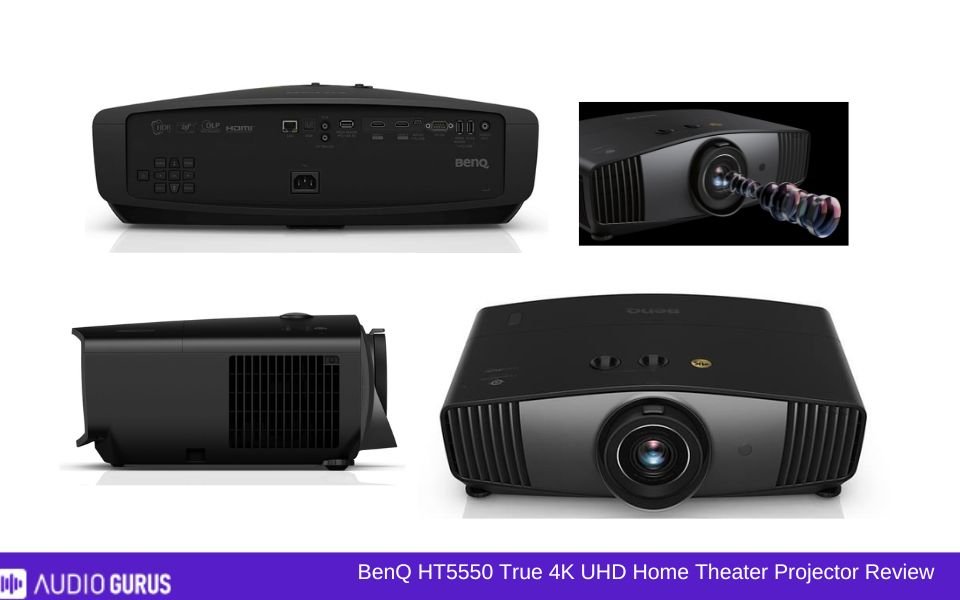
The BenQ HT5550 can be precisely what you need if you like movies or games and want a real cinematic experience right at home. Perfect for committed home theaters or poorly lit living rooms, this projector excels in medium to large areas where you can manage the illumination. It's designed for those who value immersive sound and great images over mobility and simplicity. Does it, however, live up to the buzz? Here's my assessment of its design, connection, performance, and more after months of usage.
Our Verdict
For movie buffs and gamers in medium to large environments, the BenQ HT5550 offers amazing images and a real cinematic experience. Though it lacks built-in Wi-Fi and falls short in brightness for well-lit rooms, its 4K resolution and HDR capability are extraordinary. Just two HDMI ports restrict but great connectivity. Though setting it up requires effort, the outcome is well worth it. Although it's not perfect, the HT5550 is a great choice if you're willing to pay for quality and can make sense of its peculiarities.
PROS
- Stunning 4K visuals
- Vibrant HDR colors
- Deep black levels
- Smooth gaming performance
- Sleek, modern design
- Backlit remote buttons
- Versatile lens shift
- Quiet operation overall
CONS
- No built-in Wi-Fi
- Limited HDMI ports
- Struggles in bright rooms
GENERAL
| Projector Type | DLP |
|---|---|
| Screen Size | 60 to 300 inches |
| Brightness | 1,800 ANSI lumens |
| Contrast | 100,000:1 |
| Resolution | 4K UHD (3840×2160) |
| Throw Ratio | 1.36 to 2.18:1 |
IMAGE QUALITY
| Resolution | 4K 3840x2160 (UHD) |
|---|---|
| Brightness | 1000-2000 lumens |
| Contrast | 60000-100000: 1 |
| Aspect Ratio | 16:9 |
| Pre-Calibration Color Accuracy | Yes |
| Post-Calibration Color Accuracy | Yes |
| Color Gamut | Rec.709 100% |
| Picture Mode | Bright (or Dynamic) , Cinema (or Movie) , Vivid , HDR , User (Custom) , D. Cinema , HLG , Silence , ISF Day/Night , 3D Mode |
| Picture-in-Picture | N/A |
PROJECTION TECHNOLOGY
| Illumination Technology | Lamp (Bulb) |
|---|---|
| Display Technology | DLP |
| Geometric Correction | Yes |
| Edge Blending | N/A |
| DICOM | N/A |
| Frame Interpolation | Yes |
| Anamorphic Ready | N/A |
THROW DISTANCE AND SCREEN SIZE
| Throw Ratio | Standard Throw |
|---|---|
| Screen Size Range | 60" to 300" |
| Projection Distance | Approximately 3 meters for a 100" screen |
| Optional Lenses | N/A |
| Vertical Lens Shift | Yes |
| Horizontal Lens Shift | Yes |
| Lens Memory | N/A |
| Zoom Ratio | 1.6x |
| Power Zoom | N/A |
| Power Focus | N/A |
| 24/7 Duty Cycle | N/A |
THROW DISTANCE AND SCREEN SIZE
| Throw Ratio | 1.36 to 2.18 |
|---|---|
| Screen Size Range | 60" to 300" |
| Projection Distance | Approximately 3 meters for a 100" screen |
| Optional Lenses | No |
| Vertical Lens Shift | ±60% |
| Horizontal Lens Shift | ±23% |
| Lens Memory | N/A |
| Zoom Ratio | 1.6x |
| Power Zoom | N/A |
| Power Focus | N/A |
SMART FEATURES
| Wireless Screen Mirroring | |
|---|---|
| Wireless Casting | |
| Streaming Apps Built-in | No |
| Voice Control | |
| Smart Calibration | N/A |
| Auto Keystone | N/A |
| Smart OS | N/A |
| Automatic Lens Cover | N/A |
| Ambient Light Sensor | N/A |
| Dynamic Image Adjustment ( | N/A |
| User Profiles/Personalized Settings | N/A |
| Crestron RoomView | N/A |
| Close-Captioning | N/A |
| Parental Controls | N/A |
| Customizable Home Screen | N/A |
| CEDIA | N/A |
AUDIO
| Built-in Speakers | N/A |
|---|---|
| Audio Power | No |
| Speaker Type | No |
| Sound Modes | No |
| Dolby Audio Support | No |
| Dolby Digital | N/A |
| Dolby Digital Plus | N/A |
| Dolby Atmos | N/A |
| DTS Audio Support | N/A |
| DTS-HD Master Audio | N/A |
| Audio Formats Supported | |
| Audio Enhancements | |
| Auto Audio Sync | N/A |
| Dynamic Range Compression | N/A |
| Loudness Equalization | N/A |
PERFORMANCE
| Input Lag | < 100ms |
|---|---|
| Refresh Rate | 60Hz , 120Hz |
| Frame Rate | |
| Eco Mode | Yes |
| Full Power Mode | Yes |
| Standby Mode | Yes |
| Manual Keystone Adjustment | Yes |
| Auto Keystone | N/A |
| 4-Point Keystone | N/A |
| Keystone Vertical (Keystone Vert) | Yes |
| Keystone Vertical + Horizontal (Keystone V+H) | N/A |
CONNECTIVITY OPTIONS
| Bluetooth | N/A |
|---|---|
| Bluetooth Audio Support | N/A |
| HDMI | N/A |
| HDMI (MHL) | N/A |
| HDMI (HDCP 2.2) | Yes |
| HDMI (HDCP 2.3) | N/A |
| HDMI 2.1 | N/A |
| USB-C | N/A |
| USB-A | Yes |
| VGA | Yes |
| USB Media Player | N/A |
| Ethernet | N/A |
| DVI | N/A |
| SD Card Slot | N/A |
| Optical Audio Output | Yes |
| Wi-Fi | N/A |
| Wi-Fi Direct | N/A |
| Wi-Fi Connectivity | N/A |
| RS232 (Control Port) | Yes |
| 3.5mm Audio Out | Yes |
| 3.5mm Audio In | N/A |
| Multi-Room Audio Support | N/A |
| RCA Composite Video | N/A |
| Component Video (YPbPr) | N/A |
| S-Video | N/A |
| 12V Trigger | Yes |
| Microphone Input | N/A |
| HDBase T | N/A |
| 3-RCA Component | N/A |
| 3-BNC Component | N/A |
| 5-BNC RGBHV, Comp | N/A |
| Microphone Input | N/A |
BUILD
| Screen Size | 300.54 |
|---|---|
| Dimension | 349 mm (W) x 168 mm (H) x 492 mm (D) |
| Weight | 6.5 kg |
| Lamp Life | ormal mode: 4,000 hours; SmartEco mode: 10,000 hours; LampSave mode: 15,000 hours; ECO mode: 10,000 hours |
| Cooling System | N/A |
| Dust-Proof Design | Yes |
| Shock Resistance | N/A |
| High MTBF | N/A |
| Warranty | Not specified |
RATING:
| Video | 3.54 |
|---|---|
| Connectivity | 3.57 |
| Audio | 2.64 |
Design
The HT5550 caught me initially with its design. It radiates professionalism, is sleek and sophisticated. The matte black surface is fantastic and does not readily show fingerprints. If you have a separate entertainment area, you may boldly display this. The front and center lenses give the work a serious attitude.
Said another way, this is large and weighty. Trying to install it on the ceiling or carry it around worked a little physically. Though it's not quite portable, consider carefully if you want to move it often. Once I had it put up, however, I hardly saw its scale. It fit the rest of the space really well, and it's not distracting in movies.
Connectivity
Though in certain respects it succeeds, I had great expectations for connection. The HT5550 has all the typical connections one would find. Two HDMI connectors, a USB port, and even an RS-232 port for sophisticated configurations abound. Everything worked well when I linked my game system and streaming stick.
The nice thing is that it effortlessly manages 4K signals. Watching Netflix in ultra-high resolution is breathtaking; there was no clear lag while gaming either. I do wish, however, there were more HDMI ports. Two seems inadequate when you are juggling between gadgets including a Blu-ray player, a gaming console, and a streaming device. I started swapping wires and unplugging continuously.
One other drawback is Wi-Fi is not incorporated into this device. Although many projectors lack it, at the cost I expected it. For wireless entertainment, I had to depend on a streaming stick or outside device, which added to the clutter. If you like little wiring, this might irritate you.
Performance
Let us now discuss performance—what counts most. Here is when the HT5550 excels. Watching movies on it transports one to a small theater. The 4K resolution and HDR support expose amazing details. I recall seeing "Dune" on it, and the sand dunes looked so realistic I nearly felt the heat. Particularly with HDR, the colors are rich, vivid, and natural. Even darker sequences, such as those in "The Batman," were clear and simple to follow.
But it's not flawless. Although really good, the brightness may suffer in a room with plenty of natural light. Using it during the day with my curtains half open, the picture seemed washed out. But at night or in a completely black space, things are different. The contrast is great; black levels are deep enough to make thrillers and horror films very compelling.
Surprising me was gaming on this projector. I like fast-paced games, hence the low enough input latency didn't bother me. Playing "Spider-Man: Miles Morales" seemed seamless, and the big screen enhanced the immersion of swinging across New York City. Simply said, it is not as quick as a specialized gaming display. While casual gameplay is fantastic, competitive players may find a little delay.
Where and When to Use
Either a dark room or a dedicated home theater will let this projector perform as intended. Blackout curtains can help you maximize it if you want to use it in a light living room during the day. Though putting it up outdoors was a little more trouble, I have used it for movie evenings with friends, binge-watching TV series, and even some outdoor movie screenings.
Although the HT5550 is also fantastic for family picture slideshows or presentations, honestly, it seems like overkill for a projector of this kind. Made for movies, programs, and games is it. It really shines in that regard.
Compatible Devices
Connecting a variety of devices to the HT5550 has gone really easily most of the time. Streaming devices like the Amazon Fire TV and Roku run flawlessly. The PS5 and Xbox among my game systems connected without any problems. For those few occasions I wanted to showcase some holiday films, even my laptop ran well.
It is not as plug-and-play as it should be for older devices, however. I stumbled into some handshake problems with the HDMI connection while attempting to connect an older Blu-ray player. Though it was a frustrating process, after some tinkering I found it functioning. For current gadgets, however, it's seamless.
Ease of Use
Not as easy as I had imagined is setting up the HT5550. Although the options are somewhat basic, aligning and focusing the projector required some care. Though not obvious, the lens shift and zoom buttons are a lifesaver. I had to go to the handbook many times, which is not something I do with technology these days.
Once it's set up, however, using it comes easily. The remote is well-designed with lighted buttons, a little but deliberate touch for dim spaces. Switching between inputs is fast. My main complaint is that calm sequences clearly show fan noise. Though it's not loud enough to disrupt the experience, if you're paying close attention it is there.
Cost
Not sugar-coated—the HT5550 is not inexpensive. I had to consider carefully if the cost was justified when I purchased it. Though with some doubts, I would answer yes after using it for months. One of the greatest projectors in its class, the picture quality is really outstanding. But the absence of built-in Wi-Fi and limited HDMI ports seem like concessions not worth cutting at this price range.
ADVANCE COMPARE ENGINE
Select Two Audio / Video System for Detailed Comparison
ADVANCE SEARCH ENGINE
Find Your Sound System by Any Desire Specification


