Best Yamaha Floorstanding Speakers

31 October, 2022 by Admin

If you are a fan of 3-way speakers, you will love Yamaha. It manufactures speakers at different price ranges. If you want a budget-friendly floorstanding speaker, you can choose the NS-F210BL model. Floorstanding speakers are a powerful addition in your music system. You have the option to pair it with a subwoofer or create a home theater system as the connection will be made via a receiver.

Choose the receiver or amp matching the power and impedance of the speakers. if you have space in your room, choose floorstanding speakers instead of bookshelf speakers. Based on the receiver’s connections, you can connect TV, PC, laptop, etc. Choose a speaker with a higher sensitivity if you want them easy to drive.

Yamaha floorstanding speakers excel just like their receivers. Sound quality varies from model to model but they beam with clarity and accuracy. Music and movies become lifelike. Choose speaker based on your room size.

Top 4 Yamaha Floorstanding Speakers:

This section lists some of the best Yamaha floorstanding speakers.

Yamaha NS-F210BL Review:

Basic specs:

  • Drivers: 7/8" balanced dome tweeter, 2 3-1/8" cone woofer
  • Frequency response: 50 Hz-45 kHz
  • Sensitivity: 86dB
  • Input power max: 120W
  • Impedance: 6 ohms

4.3 Mixed Usages
4.3 Dialogue & Vocal Accuracy:
4.4 Treble Accuracy:
4.3 Bass Accuracy:
4.3 Imaging & Soundstage:
4.3 Dynamic Range:

Yamaha NS-F210 floorstanding speaker delivers rich and dynamic sound. It produces engaging sound while playing music and movies. It is a fast-sounding speaker that blends in well with a matching subwoofer. The result is dramatic improvement in the sound quality. It produces a balanced sound and sounds quite full.

Our Verdict

Yamaha NS-F210 is a set of compact floorstanding speakers. They have good built quality with slim profile. They are great for music but for movies, a center channel and a subwoofer will be a good choice. Voices are intelligible and the speakers can get loud enough for mid-sized rooms. Setup is simple and if you receiver has bass and treble levels, you can also tweak the sound.

PROS
  • Well built
  • Small footprint with minimalist design
  • Affordable
  • Great value for money
  • Clear mids
CONS
  • Slightly boomy bass
Where to Buy

Specification

GENERAL:

Speaker Type Floor standing speaker
Number Of Channels 2.0 way speaker
Amplification Type Passive Speaker (External Amp)
Power Source AC Powered

DRIVERS

Drive Unit 2x2
Tweeter Type balanced dome
Tweeter Size (inches) 0.875"
Midrange Size (inches) N/A
Midrange Type N/A
Woofer Size (inches) 3.125"
Woofer Type cone
Other

Specs

Power Range 120 W / 40 W
Sensitivity 86 dB
Impedance 6 ohms
Frequency Range 50 Hz-45 kHz
Crossover Frequencies 8 kHz

CONNECTIVITY:

Speaker Wire Input: Yes
Speaker Level Input N/A
Line Level Input N/A
Digital Input (Optical) N/A
Digital Input (Coaxial) N/A
RCA Input N/A
3.5mm Stereo Analog Input N/A
Aux Input
Bi-amp Input: N/A
HDMI Input N/A
USB Port N/A
Subwoofer Output N/A

Wireless Features

Bluetooth N/A
Wi-Fi N/A
Other

Connector:

Connector Type binding post
Compatible Connector Types bare speaker wire, pins, or spades
Speaker Wire Compatibility standard speaker wire

Audio Quality ( Tested )

Bass Accuracy: Tight and clear bass
Dialogue & Vocal Accuracy: Loud vocals
Treble Accuracy Decent highs
Imaging & Soundstage: Focused imaging and wide soundstage
Dynamic Range: Good dynamic range
Power Handling: Easy to drive
Frequency Response: Broad frequency response
Transient Response: Quick transient response

Build Material

Enclosure ported
Finish MDF
Color White, black, brown, piano black

Size & Weight

Height (inches) 41.3"
Width (inches) 9.3"
Depth (inches) 9.3"
Weight (pounds) 16.1 lbs
Recommended Stand Height (inches) none

Control

Handheld Remote N/A
Control by app N/A
Amazon Alexa N/A
Google Assistant N/A

IN THE BOX

Accessories: Yamaha NS-F210 speakers, 4m Speaker Cable
User manual: Yes

The floorstanding speakers measure around 9-5/16" x 41-5/16" x 9-5/16" and has a sleek profile. They show a balanced sound profile and has well-built chassis. Pair an amplifier with the speakers. With high sensitivity, they are easy to drive. Place them in mid-sized rooms and they will shine. It is suggested to place the speakers 20cm away from TV sets.

The speakers produce crisp and clear sound. Once we started listening to music tracks, we noticed the speakers can get loud enough to fill small to medium sized rooms. While the high frequencies are attacking, the mids are flat and bass is present. With a subwoofer, the overall sound performance will improve.

Use them as front L/R speaker to create a 5.1 theater system. This affordable Yamaha floorstanding speakers produce lively sound as you play music or movies. You will be impressed by the midrange clarity and powerful soundstage. Movies are enjoyable with powerful soundtracks. If you choose to install a 5.1, you will have theater-like experience. This model is one of the best Yamaha floorstanding speaker under $200.

Best for:

It is best for users who prefer small footprint tower speaker at an affordable price.

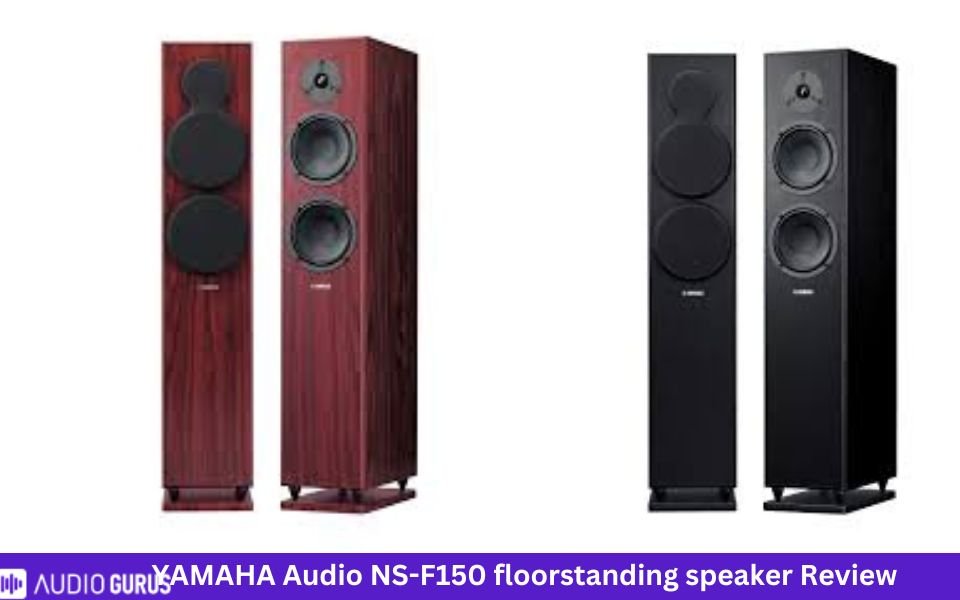
Yamaha Audio NS-F150 Review:

Basic specs:

  • Drivers: 1” soft dome tweeter, 2 6.5” woofer
  • Frequency response: 37 Hz–30 kHz
  • Max input power: 180W
  • Sensitivity: 88dB
  • Impedance: 6 ohms

4.25 Mixed Usages
4.2 Dialogue & Vocal Accuracy:
4.3 Treble Accuracy:
4.3 Bass Accuracy:
4.2 Imaging & Soundstage:
4.2 Dynamic Range:
Specification

GENERAL:

Speaker Type Floor standing speaker
Number Of Channels 2.0 way speaker
Amplification Type Passive Speaker (External Amp)
Power Source AC Powered

DRIVERS

Drive Unit 2x2
Tweeter Type Soft dome
Tweeter Size (inches) 1"
Midrange Size (inches) N/A
Midrange Type N/A
Woofer Size (inches) 6.5"
Woofer Type cone
Other

Specs

Power Range 50/180 W
Sensitivity 88 dB
Impedance 6 Ohms
Frequency Range 37 Hz–30 kHz
Crossover Frequencies Not specified

CONNECTIVITY:

Speaker Wire Input: Yes
Speaker Level Input N/A
Line Level Input N/A
Digital Input (Optical) N/A
Digital Input (Coaxial) N/A
RCA Input N/A
3.5mm Stereo Analog Input N/A
Aux Input N/A
Bi-amp Input: N/A
HDMI Input N/A
USB Port N/A
Subwoofer Output N/A

Wireless Features

Bluetooth N/A
Wi-Fi N/A
Other

Connector:

Connector Type gold-plated screw terminals
Compatible Connector Types Bare wire, banana plug
Speaker Wire Compatibility Standard speaker wire

Audio Quality ( Tested )

Bass Accuracy: Clean and tight bass but not room shaking
Dialogue & Vocal Accuracy: clearer voices
Treble Accuracy Extended and detailed highs
Imaging & Soundstage: Powerful imaging and wide soundstage
Dynamic Range: Decent dynamic range
Power Handling: Not very difficult to drive
Frequency Response: Broad frequency response
Transient Response: Good transient response

Build Material

Enclosure Ported
Finish MDF
Color Black, Rosewood

Size & Weight

Height (inches) 37.375”
Width (inches) 7.875”
Depth (inches) 14.25”
Weight (pounds) 20.9 lbs
Recommended Stand Height (inches) none

Control

Handheld Remote N/A
Control by app N/A
Amazon Alexa N/A
Google Assistant N/A

Rating System

Bass Accuracy: 4.28
Dialogue & Vocal Accuracy: 4.2
Treble Accuracy: 4.32
Imaging & Soundstage: 4.2
Dynamic Range: 4.24

IN THE BOX

Accessories: 1 pair of Yamaha NS-F150 speakers, 4m speaker cable
User manual: Yes

Yamaha NS-F150 are a good and modern looking floorstanding speakers. Build quality is strong and covered by grilles. These great sounding speakers have rich and detailed sound with punchier bass. If you are picky, pair a subwoofer for better low ends. Once paired with a receiver, you can listen to CDS, movies or music. No matter the type of content, the speakers can handle them well.

The speakers produce crisp, clear, and well-balanced sound. Include center channel, rear speakers to create a home theater. You can pair it with Yamaha rx-a780 amp or Yamaha R-S300BL stereo receiver. You can listen to the speakers for long hours as they don’t cause ear fatigue nor produce harsh sound. It is designed to perform well when HD movies or music is given as input.  

On the rear side you will see screw terminals that are gold plated. This ensures the highest signal transmission. Connect it to your TV, laptop, computer or even turntables and enjoy powerful sound.

Best for:

If you want a powerful set of floorstanding speakers, then NS-F150 is best for you.

  1. Yamaha NS-555

Basic specs:

  • Drivers: 1” aluminum dome tweeter, 5” cone, 2 6.5” woofer
  • Input power: 250W
  • Sensitivity: 88dB
  • Impedance: 6 ohms

Yamaha NS-555 is a three-way floorstanding speaker. They measure 8-3/4" x 38-9/16" x 13-9/16". Midrange and tweeters use Yamaha waveguide horns so that the imaging is improved. Since most of our rooms aren’t well designed for theater systems, reflected sound doesn’t deliver the best results. Waveguide reduces reflected sound and increases directly emitted sound.

Place them on the given speaker stands so they are stable and doesn’t show any coloration. Elliptical cabinet minimizes diffraction. They are covered by grille and enclosure material is of high quality. The speakers are magnetically shielded so you can place them near TVs or video monitors. Like other Yamaha floorstanding models, you can create home theater with them. You are not bound to pair it with Yamaha amp or receiver, you can choose other models like Pioneer.

The speakers produce natural, crisp and the instruments are well-represented. Compared to NS-F210 speakers, this model will deliver solid and powerful performance. Even audiophiles who don’t want to scrutinize can enjoy these speakers. They are comparable to more expensive speakers.

Best for:

This model is best for users who prefer mid-range Yamaha speakers that excel in audio performance.


  1. Yamaha NS-F901PN

Basic specs:

  • Frequency response: 32 Hz-50 kHz
  • Drivers: 2 6-1/2” woofer, 5” midrange,   1” tweeter
  • Sensitivity: 89dB
  • Input power: 200W

The speakers

It is designed to have non-parallel surface so that standing waves are reduced. The speakers are tall, dark, and quite modern. Crossover network section is built with high-end materials. They produce adequate amount of bass, treble region is well-represented as well. Music and movies are enjoyable through these speakers.

Low ends are clear and deep. Treble region is clear and accurate. Cabinet and drivers are designed with such material so that the speakers produce impactful sound. The speakers are tonally accurate and delivers balanced sound.

Best for:

If cost isn’t an issue, you can choose this Yamaha floorstanding speaker to bring powerful sound in your house.

Best alternative:

Have a look at the closest competitors of Yamaha floorstanding speakers.

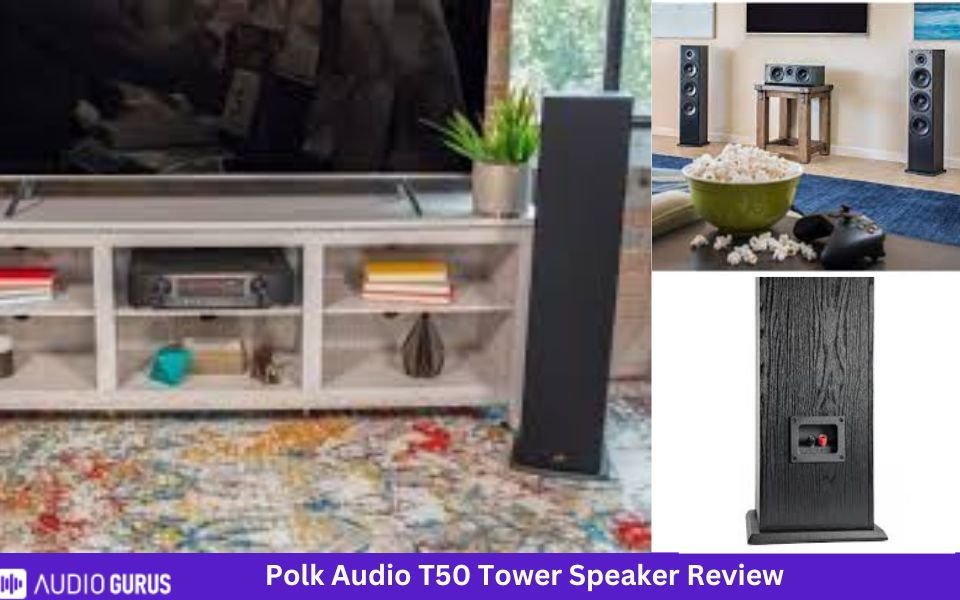
  • Polk T50

Basic specs:

  • Drivers: 1 1" Tweeter, 2 6.5" Bass Radiator, 1 6.5" Mid/Woofer
  • Frequency response: 38 Hz → 24,000 Hz
  • Impedance: 8 ohms → 6 ohms
  • Peak power handling: 150W
  • Sensitivity: 90dB

4.44 Mixed Usages
4.5 Dialogue & Vocal Accuracy:
4.5 Treble Accuracy:
4.4 Bass Accuracy:
4.4 Imaging & Soundstage:
4.4 Dynamic Range:
Specification

GENERAL:

Speaker Type Floor standing speaker
Number Of Channels 2.0 way speaker
Amplification Type Passive Speaker (External Amp)
Power Source AC Powered

DRIVERS

Drive Unit 2x2
Tweeter Type Wave Guide Tweeter
Tweeter Size (inches) 1
Midrange Size (inches) N/A
Midrange Type N/A
Woofer Size (inches) 6.5
Woofer Type extended throw composite
Other

Specs

Power Range 20 - 100
Sensitivity 6 ohms
Impedance 90 dB
Frequency Range 40Hz-20 kHz
Crossover Frequencies Not specified

CONNECTIVITY:

Speaker Wire Input: Yes
Speaker Level Input N/A
Line Level Input N/A
Digital Input (Optical) N/A
Digital Input (Coaxial) N/A
RCA Input N/A
3.5mm Stereo Analog Input N/A
Aux Input N/A
Bi-amp Input: N/A
HDMI Input N/A
USB Port N/A
Subwoofer Output N/A

Wireless Features

Bluetooth N/A
Wi-Fi N/A
Other

Connector:

Connector Type 5-way binding posts
Compatible Connector Types banana plugs, spades, pins, bare-wire
Speaker Wire Compatibility standard speaker wire

Audio Quality ( Tested )

Bass Accuracy: Tight and clear bass but not room shaking
Dialogue & Vocal Accuracy: Crisp and clear vocals
Treble Accuracy Decent highs
Imaging & Soundstage: Great imaging and soundstage
Dynamic Range: Great dynamic range
Power Handling: They are easy to drive so a less powerful amplifier will work as well.
Frequency Response: Wide frequency response
Transient Response: Good transient response

Build Material

Enclosure Bass Reflex
Finish MDF
Color Black

Size & Weight

Height (inches) 36.25
Width (inches) 9.25
Depth (inches) 10.25
Weight (pounds) 24.8 lbs
Recommended Stand Height (inches) none

Control

Handheld Remote N/A
Control by app N/A
Amazon Alexa N/A
Google Assistant N/A

Rating System

Bass Accuracy: 4.4
Dialogue & Vocal Accuracy: 4.46
Treble Accuracy: 4.52
Imaging & Soundstage: 4.41
Dynamic Range: 4.4

IN THE BOX

Accessories: 1 Tower Speaker, 1 Grille, Warranty Registration Card
User manual: Yes

Polk uses Dynamic Balance Technology to improve the speaker performance. It supports Dolby and DTS so movie watching will be engaging. They are designed to deliver broader soundstage that is room-filling. It is made of MDF, and wood vinyl finish gives a classy look. With a dimension of 36.5"x9.25"x8.75", the speakers aren’t too large. They are one of the best affordable floorstanding speakers.

Pair other speakers from Polk to create a 5.1 home theater system. It produces clear and bright sound. It has accurate tonal characteristics and delivers rich sound. We loved this system while watching movies. We felt the same as we switched to music. The recommended amp power is 20-100W so choose an amp by matching the power and impedance.

Out of the box accuracy is pretty good. It sounded smooth and clear with excellent dynamics. The speakers can get quite loud, and you can listen to them for long period of time. They sound bigger and better than its price. It is far better than other high-priced speakers. include a subwoofer if you are sensitive about low ends. Connect it to TV, PC or any other audio source as per your receiver.

Best for:

Polk T50 are ideal for users who want floorstanding speakers to fit into their tight spaces. This pair is one of the best sounding floorstanding speakers.

  • MartinLogan Motion 60XT

Basic specs

  • Frequency response: 35–25,000 Hz ±3dB
  • Sensitivity: 94dB
  • Impedance: 4 ohms
  • Drivers: 1.25" × 2.4" HF, 6.5” mid frequency driver, 2 8” LF

The speakers can get quite loud and reveals accurate midrange with punchier low ends. Driver materials are of top quality. Tweeters produce clean and clear treble region. It sits on spikes to improve stability and the drivers are protected by perforated grille. Martin Logan takes speakers seriously. A combination of innovative engineering and advanced technologies ensure the speaker is of high quality.

The Motion 60XT produces good soundstage with minimum distortion. Use this speaker for movies or music. It can handle classical and jazz contents easily. With high sensitivity, the speakers are easy to drive. Woofers are located in such a way that the resonance will be reduced. Internal bracing and isolation are excellent.

Allow the speakers to go through break-in period and hear the sound. The speakers produce an open sound so that any type of content is enjoyable. To further improve the sound, you can always add a subwoofer. Recommended amp power for this pair is 20-400W. They aren’t cheap and that is revealed by the build quality and performance.

Best for:

 This speaker model is best for users who want the best performance along with good looks.

Parting words:

Some of the best Yamaha floorstanding speaker are NS-F901PN and NS-F150. If you prefer compact floorstanding speakers check the NS-F210BL model. You can use the floorstanding speakers as stereo or, create a complete theater system. You will find speakers at different price range and size. Driver size, sensitivity and frequency response varies as well.

Make sure you have enough space in your room to place the speakers. If you want to look into other brands, we suggest checking Polk or Martin Logan.

FAQ

Which is better bookshelf speaker or floorstanding speaker?

Both bookshelf and floorstanding speakers are best based on the scenario. If you have tight space or want small speakers with best sound, bookshelf speaker will suit you. Floorstanding speakers are larger than bookshelf speakers so they will produce bigger and better sound. This is because driver size and cabinet size affect the sound quality.

Are floorstanding speakers good for movies?

You can use Floorstanding speakers for both music and movies.

More Articles


Best Speakers for Outdoor Projectors
Most projectors come with built-in speakers, but some don't. Some people like these speakers because they make a lot of noise But, sometimes you need a louder sound for outdoor movie nights or a lot of people to see the movie. In this case, you need to connect your projector to speakers that aren't on your projector. With louder sound, you can watch movies and TV shows at home like in a movie theatre. Here are some of the best speakers for a projector that you can use outside. To keep your outdoor projector working, you might want to connect external speakers to it. In your backyard, you can put speakers on the wall. You can listen to the music while you do this! You should choose mounted speakers if you have a projector set up in your home to watch movies and TV.A portable speaker can be very useful when you want to watch your show in different places. Bluetooth speakers are easy to move around. When you buy an outdoor projector, you can choose from two types of external speakers. We'll look at both of them in this article! In the end, we did a lot of research and found the best speakers for your outdoor projector speakers. Polk Audio Atrium 4 Outdoor Speakers It's a good idea to buy this pair of speakers if you want the best speakers for your outdoor projector. This certified all-weather loudspeaker is best for professional use, like in the military or in factories. If you want to watch movies or listen to music at home, this is the best thing to do. In the open, you don't have to be afraid. Furthermore, it has been made to withstand different types of weather. It gives a louder sound that spreads out more, and the bass is much more powerful, too. It is the best outdoor speaker because it can last for a long time. The sound quality of this speaker is so good that it makes you feel like you're in the middle of the action. It has a clear and loud sound that covers a lot of space and gives you all the information you need. The sound quality is about the same as big and expensive speakers. The materials used to make the product are standard and durable. These parts are made out of aluminum. Stainless steel and brass have been used to make Polk speakers, and they have been used. In white and black, Polk Audio Atrium 4 speakers can be used to listen to music. Their design is very nice, and they look very nice, too! Because it's so small, it can be used outside and be set up quickly. Each speaker has 4.5-inch drivers and.75-inch tweeters, which allow for realistic sound production at different volumes. This is how it works. This speaker is very easy to put up because it has a 180-degree speed-lock mounting mechanism. You can put it on the ceiling or the wall with its brackets. In the package, there are two brackets and screws that you can use to put these speakers in place. Use the screws to attach the brackets. When you're done, put the Polk Audio speakers on the brackets. Then, connect wires to the speaker. Finally, tighten the screws to make sure the speakers stay where they are. Product Differentiator Because this speaker has a very low price, he or she gives high-quality results. Worth the money. Pros • Better resistance to bad weather • The installation process is very easy. • Predominant sound with a wide spread • Material that can last a long time as well as 180-degree speed-lock mounting • Small but efficient • Realistic sound with a range of volumes. Cons • Bass needs a little more work. • The grill gets rusty. Polk Audio Atrium 5 There's a lot of trust in Polk as a brand. This speaker comes from Polk. Polk Audio Atrium 4 is also the best external speaker for an outdoor projector. Atrium 5 is even better than Atrium 4. It is made of stainless steel and aluminum, which makes it strong and rust-proof. Also, it is very light-weighted at just 4.6 pounds. It's small size makes it easy to move. It has the best price and the best efficiency for the best value. This speaker is small and has a nice design with a good look. It comes in black and white. Drivers that are 5.25 inches long come with Atrium 5. They are also 1 inches wide. Butyl rubber is what makes the bass sound strong. The sound is smooth and clear, and it has all the information you need to understand it. This speaker is great for the backyard, patio, living room, pool, and many other places. It can also be used in a lot of different ways. It has a normal sound that can be used for both work and at home. Water and wind can't get through this speaker. It can also withstand very cold and very hot weather. All-weather certified means that it is the best speaker for all kinds of weather, so it's the best choice. There are 180-degree mounting brackets for the Polk 5 that can be quickly locked into place. A single click will do the job. It can be put up either vertically or horizontally, depending on what you need. Mount it on the ceiling or the wall without any doubt. Even if the sound comes from somewhere else, it sounds good. It has a lot of compatibility with all kinds of different things. There are a lot of things about the Polk speaker that make it the best speaker for an outdoor projector. Product Differentiator If you want to use it with a projector outside, you will get the best sound possible. The sound has a wide range and is good for a big crowd. Pros • A lot of strength to deal with bad weather as well as 180-degree speed-lock mounting, • Small and easy to move around • Good sound with a lot of coverage • Durability is also a good thing. • Can be used for a lot of things. Cons • Low volume doesn't always give the best quality, though. Bose 161 Speaker System This is a speaker that can be used for many things and has great sound quality. It is small and has a modern look. You can put this smart speaker on your bookshelf, desk, or put it on the wall or ceiling outside. This speaker is better than other speakers. Because it has Articulated Array driver placement, which makes the sound stereo in every direction. It is black. It is the best speaker for an outdoor projector because it has a lot of power. At a low price, it has the best sound in every situation. It also has the same performance and durability as more expensive and big-sized speakers. It has a 2.5" Twiddle driver in each speaker that improves the sound by letting air flow through its small case. In this case, it's as loud as a big speaker. If you want to put this speaker near your TV, computer, or projector, you can cover it with a magnetic shield. It is very light-weight; it only weighs 3.31 pounds. So, it is very easy to take with you and you can listen to good sound anywhere. In this speaker, there is a circuit that automatically protects the drivers from being over-driven by too much sound. This feature makes it more reliable and doesn't make noise while it's playing music. The sound spreads out more and has more clarity and sharpness. Low volume does not change the quality of the sound. It has a simple way to set it up. Screws and brackets come with the purchase so you can put it where you want. You can put it on both sides of the wall. It is very compatible with a lot of different things. You can connect it to amplifiers or receivers that have 10 to 100 Watts of power, so you can play music. Product Differentiator It is also weather-resistant and withstand even the most bad weather. This means it can be used both inside and outside. Pros • Slim and smart • This looks good and is easy to use • Light-weight and easy to move around • Stereo sound with surround sound is very good. • It's easy to set up. · A good deal on high quality at a good price • New features and systems Cons • The bass is low. • When the volume is too low, the sound is not as good. Kicker KB6000 Outdoor Marine Speakers This stereo speaker system is in second place when it comes to choosing the best external speaker for a projector that is outside. A full-range and efficient speaker, like this one, is what you'll find here. It is weather-resistant and very strong. This speaker can be used both inside and outside. This speaker has a clear and clear sound. It can spread its sound out over a bigger area. For people who want to have fun outside, this is the best speaker. This super-awesome speaker can be used for a lot of different things. Can be used on a boat, near the pool, or in a yard. For movie nights or home theatre, this speaker would be a good choice. It's very easy to connect it to your projector. It is very easy to use with any kind of projector. In order to make you feel like you're in the movie or TV show, it improves the sound. You can feel the bass in your heart. It doesn't need any subwoofers to make it sound good. The bass sound is dominant. At high, middle, and low volumes, the sound is great. If each speaker can reach 150 Watts, its RMS power is 75 Watts. In just a few minutes, you can put this speaker on the ceiling or wall. It comes with brackets and screws, so you can do it quickly and quickly. Product Differentiator Cost-wise, it's also a good deal. High-quality sound can be yours even if you have less amount of money. Pros • Weather-resistant • It's easy to set up. • Can be used both outside and inside. • A sound with a wide range of dispersion. • At a good price • Good sound at different volumes Cons • Bass should be better JBL Charge 3 Bluetooth speaker. JBL is a well-known brand, and its products are very well-liked. Their Bluetooth speakers are the best speakers for projectors that are outside. The JBL Charge 3 has a lot of bass and can be up to 30% louder than other wireless speakers in the same price range, which makes it sound better. You can buy it for less than other speakers of the same quality. It's a good deal. Also, this speaker has very loud and clear stereo sound. It is very important to have an outdoor projector. It can stay underwater for 30 minutes if it is 3 feet under the surface of the water. This amazing feature makes it a good friend for boat rides, beach trips, and pool parties. When it comes in a black color, it has a sleek and elegant look. It weighs just 1.8 pounds. This smart speaker is very easy to move around. Good-sized buttons on the top of the speaker let you change the volume, connect Bluetooth devices, and turn it on and off. It has a special JBL button that lets you connect it to a lot of JBL speakers to get great sound. Each type of device and app can use it, so it's good for everyone If you want to play music or watch a movie, you can play it at high and low volumes because it doesn't have distortion. If you buy this, you get a built-in charger with it. So, you can charge the speakers while you listen to music. It also has a built-in microphone that can be used to make calls. It is very easy to connect to. Finally, you can connect it to three things, like a projector, a smartphone, or a tablet. It has a battery made of Lithium-ion polymer that has a lot of power (22.2 Wh). Battery life is 20 hours, and it only takes 4.5 hours to charge it up again after that. Product Differentiator There is a lot of sound coming out of this small speaker, but it is very loud and clear. It also sounds good at both high and low volumes. Pros • A 6000 mAH power bank will last for 20 hours. • Equipped with a charger • High-pitched high bass sound works with a lot of different devices and apps • A smart speaker with a good design as it is cheap and good Cons • Can get hot if used for a long time. Bose SoundLink Revolve+ Bluetooth Speaker If you are searching for a highly portable wireless speaker then Bose is the best choice.It has many amazing features that rank it among the best external speaker for an outdoor projector. With an efficient Lithium-ion battery that has 16 hours of life, it allows you to enjoy unlimited music or movies. This speaker suits multiple purposes. The super loud sound of Bose speaker can fill a large room and can also turn your backyard into a music concert. A built-in mic allows making conference calls with clarity of voice. You can also perform different operations by giving voice commands. You can connect it with any device via Bluetooth. Additionally, it keeps records of the last paired devices. This feature allows easy connectivity. A fine flexible fabric covering adds to the beauty of this speaker and makes it easy to carry. The sleek aluminum body makes it durable. It is IP-4 rated and highly waterproof. Bose speaker is available in Triple Black and Lux gray colors. Its connectivity range is 9 meters that is pretty fine. It also shows high compatibility with Google and SIRI and can also be used to make and receive calls. Bose Connect app enables you to connect easily with different Bluetooth devices. Product Differentiator The thrilling sound with deep bass gives a 360-degree immersive listening experience. You will forget its small size after listening to the loud and crisp stereo sound. Pros • 360 degrees sound production • 16 hours battery life • Aluminum body with fabric covering • High bass and loud sound • Supports multiple devices • Convenient to connect • Smooth and deep sound • Easy portability with a decent design Cons • Connects Bluetooth devices automatically • Splash-proof instead of waterproof Echo Dot 3rd Generation Smart Outdoor speaker This smart speaker is equipped with all the modern features. Echo Dot will turn your home into an entertainment centre. It is the best choice for smart home appliances. Various modern features place this amazing speaker at first level among the best external speakers for an outdoor projector. The most incredible thing is that this speaker guards your house. Yeah! You read it right. It is equipped with an Alexa guard. You can protect your home by enabling the Alexa guard. It detects unusual sounds like the breaking of glass. It can also work as a fire alarm and smoke alarm. You can call to emergency helpline through the Echo Dot speaker. Echo Dot 3rd generation speaker has improved quality and additional characteristics as compared to the older versions. You can easily pair it with your projector. It occupies a small space and is highly portable. The beautiful design makes it an attractive little speaker. An amazing choice for gifts and surprises! This smart speaker is compatible with multiple devices and apps. You can connect this wireless speaker to the Apple store, Amazon, Spotify, Pandora, and many other apps. It also detects voice commands. It can be paired with Fire Stick, podcast, or radio. Some other amazing features of this speaker allow you to set reminders, make a to-do list, create events and adjust timers by giving manual or voice commands. Product Differentiator It allows you to check the weather, traffic, restaurant hours, sports scores, news, and much other information. Additionally, it also works as an intercom in your home. Is not it cool? This smart speaker is efficient enough to give a louder and crisp sound. So, it gives you theatre-like sound quality. Pros • All in one speaker • Equipped with countless amazing features • Modern and smart speaker • Alexa guard protects your home • High compatibility with multiple apps and devices • Detects voice commands • Louder and crisp sound • Allows navigation and information search • Can be used as an intercom Cons • Pose occasional problems in voice detection • Auxiliary cables are not provided with the speaker Bose SoundLink Revolve+ Bluetooth Speaker This speaker is compact and smart. Therefore, it is an ideal choice if you are looking for the best external speaker for an outdoor projector. It allows gesture control to control and manage music. This wireless speaker offers great connectivity. You can connect it to two devices simultaneously. It can be connected within 100 feet range. It supports Google and SIRI. You can receive and make phone calls, can adjust volumes within 100 feet of distance. It has dual microphones that are dust resistant and give a crystal clear sound. The low and high volumes give the same quality of sound. An in-built alarm clock adds to the features of this speaker. You will be amazed by its impressive, clear, and loud sound which is dispersed in 3-D dimensions to immerse you in the music stream. This speaker is portable and you can install it anywhere. It is fully waterproof and also shockproof. It is equipped with a Lithium battery that lasts for 15 hours. You can enjoy your music or movie endlessly. It weighs just 1.2 pounds and is highly portable. Hence, you can take it with you on the mountains, in caves, on a boat ride, family trip, beach, and at pool parties. You can pair up multiple Ultimate Ear speakers to create an incredible sound system at your home. The sound quality is excellent with high bass and full sharpness. Product Differentiator The loudness of sound is 25% higher as compared to other speakers of the same price range. Pros • Fully waterproof and shock-resistant • 15 hours battery life • Sleek design with high portability • Very light-weighted; 1.2 pounds • 100 feet connectivity range • 360-degree immersive sound • Louder than other speakers of the same price • Gesture control • Compatible with Goggle and SIRI • Offers alarm clock option Cons • Switching between playlists may pose an issue • Louder but has a low bass FUGOO Tough 2.0 – Portable Outdoor Waterproof Speaker If you want clear, crisp sound and deep bass then this speaker is the best choice for you. This speaker pairs up wirelessly with your Bluetooth-supported projector. It serves multiple purposes as you can use it for home entertainment, family tour, and backyard parties. FUGOO is also suitable for professional use like business, class presentations or conference rooms. Its decent texture and sleek design look beautiful. Furthermore, a waterproof and shockproof jacket is included in the purchase. You can use it underwater for 30 minutes. This feature makes it the best choice for pool parties, boat rides, and beach picnic. You can operate it in the dark with full convenience as it has control buttons that glow in the dark. A remote control allows you a convenient setup. This speaker is equipped with all the modern accessories. It has a beautiful outlook, louder sound, and high durability. Eight in-built acoustic drivers give 360-degree audio experience. You feel immersed in the sound. Its battery life is 10 hours that is pretty long. Another amazing feature of this speaker is its compatibility with various media devices like Google and SIRI. The voice command feature allows searching for anything with super ease. It is also equipped with a full-duplex speakerphone. You can chat using hands-free. In addition, fiber resin and solid aluminum have been used in its manufacturing. This high-quality material makes this speaker durable and rugged. Above all, it offers various mounting options. You can mount this speaker readily at any place using its strap, rope, or tripod sockets. Product Differentiator This speaker is waterproof, dust resistant, and shock-proof. Its high endurance to all weather conditions makes it the best speaker for outdoor use. Pros • 100% waterproof • Fully resistant to weather changes • Best for outdoor projector • Extremely light-weighted: 1.41 pounds • Multiple mounting options • 360 degree sound experience • 8 fine real drivers • Rechargeable battery with 10 hours life • Compatibility with Goggle and SIRI • Multipurpose wireless speaker Cons • Large in size light in weight Final Words We have selected the best goods for you after doing extensive research. For your outdoor projector, we've provided you with unbiased assessments of the top external speakers on the market. For the most part, this page serves as a comprehensive resource for anyone looking to purchase an external speaker for the projector. However, you can choose to meet your needs and wants. Frequently Asked Questions Can you hook up speakers to a projector? Yes, you can. When you buy a projector, it comes with its own set of inputs and outputs. You can connect a projector to speakers directly or indirectly, depending on what you have. The most common ways to set up a projector are to use the built-in speaker or connect the speakers directly to the projector. How do you hook up speakers to an outdoor projector? If your projector is Bluetooth-enabled, connecting a Bluetooth speaker is a quick and simple process. It is, however, susceptible to interference from other gadgets and wireless devices, and the sound quality will not always be as good as it would be with a connected connection. Using your projector in conjunction with a Bluetooth speaker is as follows: Turn on the Bluetooth speaker and make sure that pairing mode is enabled. Enable Bluetooth on your projector's settings menu and search for the speaker using the device's name. Take the connection and, if necessary, input a pairing code to complete the setup. When both the projector and the speaker are turned on in the future, the speaker should automatically connect to the projector. Do outdoor movie projectors have speakers? It depends on their types. Some come with built-in speakers, but not all of them do. To make your living room look like a big movie theatre, you'll need a projector, something to show on it, and a sound system. You don't want to forget about these things.
-Read More
RPX vs IMAX: Feature Analysis
RPX vs IMAX, which is better? While both these movie formats are better than conventional ones, RPX has several advantages over IMAX. On the other hand, IMAX is quite good for slightly lower cost than RPX. If you understand the differences clearly, you can choose the one for better viewing experience. Although IMAX initially focused on documentary, later its area of interest became entertainment as well. IMAX delivers brighter and close to reality images in theaters. While the ticket prices of these theaters are quite high compared to standard ticket price, they also deliver superior movie experience. In case you are using laser IMAX, then the IMAX digital will improve the performance of images. It is far better than Xenon projectors. RPX use good projectors, has decent audio with a ‘punch’ on seats. The seats are upgraded with leather material and cushioned for comfort.  What is IMAX? IMAX stands for Image Minimum. It uses two 2k projectors. It uses high-resolution cameras, film formats, projectors, and theaters to deliver optimum viewing experience. The images are superimposed with a half-pixel offset. Deployment of super-resolution imaging enhances the resolution to 2.9K. IMAX uses two independent cameras to achieve the illusion of depth. These cameras are for left and right eye and are placed 2.5” apart. This is how you can visualize a 3D film on 2D screen. What is RPX? RPX means Regal Premium Experience. There are several differences between RPM and IMAX. It is also a theater technology that is ahead of IMAX. RPX is the latest and huge screen launched by the Regal Cinema. It uses dual 30,000 lumen digital projectors, Dolby Atmos sound system or an 11.1 channel. Auro 11.1 sound system has 273 loudspeaker components plus eight 21-inch subwoofers. Table: RPX vs IMAX Comparison   IMAX RPM Screen size 52 feet by 70 feet 40 feet by 60 feet Can play 2D and 3D 2D and 3D Seat comfortability better best Speaker system 12.1 7.1 In-seat speaker no Yes Cost  High Higher Screen size: Comparing RPS vs IMAX screen size, IMAX has larger screens or in other words, taller. One of the largest IMAX screen sizes in 144.3 ft × 75.4 ft. IMAX movie screen size in auditorium are limited to 1.89:1 aspect ratio. Regal premium experience vs IMAX, their screen size differs in terms of aspect ratio. IMAX movie theaters have a dome shape in a large gigantic screen. Comparing IMAX vs traditional movie theaters, IMAX screens are 6 times larger. They measure by 52 feet by 70 feet. The dome shape creates immersive visual experience rather than flat screens. There is other type of screen as well that shapes as a square. Normally, RPX screens measure 40 feet by 60 feet. The size of RPX screens will vary based on your location and in most cases, they have a flat shape. Although RPX screens might be a bit shorter, it is still quite large than conventional ones. Seat comfortability Comfortability matters a lot when you want to relax and enjoy the cinema. Comparing IMAX vs RPX theaters both excel in this case. IMAX builds attractive seating arrangement. The seats have extra padding that makes it very cozy and comfortable to sit for longer period of time. However, RPX wins by taking the comfortability up by another level. The RPX theater seats are soft and padded along with they are made from leather. This gives user a premium feel. They have wide reclining seats that are cushioned. Even with fully reclining of seats there is adequate space in front of them. While some rows of the theater have two armrests for each seat, others may have only one that you have to share. This can be an issue. While choosing your seat, you can select the upper seats above the center row. In that way you don’t have to move you head around to view the large screen. Technology IMAX propriety technology DMR (Digital Media Remastering) can convert non-IMAX films into IMAX format. In 2020, IMAX announced the use of ‘Filmed In IMAX’ that uses high-quality digital cameras for making IMAX-format films. As a projection technique, IMAX theatres have high-powered laser light engine. Comparing these to standard xenon lamps, IMAX lasers use two 4K proprietary digital projectors. When this is ‘shed’ on giant screens, it results in super bright and clear images. IMAX is popular of using high-quality filmmaking tools. RPX owns premium quality technologies with the use of Digital projectors. Image Quality RPX uses bigger and high-quality digital projectors.  This means the display is much better than IMAX. It will be pleasant on your eyes to watch for long time but the images will be slightly less bright than IMAX. IMAX has consistent performance. Optimum clarity, higher brightness and superior details will result in the original version of the movie. To achieve producer’s version of the movie, it uses DMR and takes each frame and works on them with precision. It uses two projectors at the same time seeking sharpness in images. The IMAX movie theaters are planned and designed so that consumers get the best experience. Standard film formats have size of 35 mm or 70 mm. On the other hand, IMAX film sizes are available in 15/70 mm. Comparing this to conventional 32mm film, the IMAX film size is around 10 times larger. This is another reason to achieve optimum clarity. Comparing RPX vs IMAX image quality, RPX movie theaters ensure good experience while watching 3D movies as it will be easy on your eyes. While the brightness isn’t excellent, it is decent and adequate. Apart from watching 3D movies, in most cases, IMAX and RPX will deliver similar experience. IMAX might be the winner for 2D contents as it designs the users to sit closer. Sound Quality: Comparing RPX vs IMAX audio quality, IMAX becomes a better choice. IMAX theater sound system has excellent tuning and accuracy. There is sweet spot for each seat. It uses patented 12.1 channel 15,000-watt digital speaker that has broader frequency response. It incorporated well trained audio engineers who excel in building high-fidelity sound systems. The sound is crystal clear, room filling and delivers movie effects with impact. Along with sound engineers, IMAX movie theater geometry allows the audio to flow in every corner of the room. RPX has a 7.1 channel surround system. Unlike IMAX, it embeds low-frequency transducers into the chairs. In-seat sound is actually for feeling each scene you watch on the screen. While some users might like the extra sensory impact from the vibrations, others find this distracting. RPX movie sound can get quite loud and at some point, it might hurt your ears. It is best for people with hearing issues. IMAX sound system is best for audiophiles but some may prefer RPX as well. There are some IMAX cinemas that support Dolby Atmos. It ensures you experience and listen whispers, hustling of leaves and low-end effects of the cinema. Although you will prefer one from IMAX and RPX, they both deliver powerful sound with details on soundtrack. Type of Content: While both these types of theaters are suitable for watching movies, IMAX theaters are best for documentaries in institutions, museums, etc. Different type of movies, animated series can be watched in IMAX screens. RPX is best for all movie types. It excels in with dialogue-oriented movies. Cinemark XD vs IMAX: What Is The Real Difference Parting Words: IMAX vs RPX comparison shows they are suitable for different contents. Whether you choose IMAX or RPX, both will deliver outstanding imagery and larger-than-average screen sizes. Auditorium design and screen size makes these theaters a better choice over traditional ones. IMAX movies with 70mm film prints will deliver the best image quality. RPX images are a bit less bright than IMAX but that is needed for watching 3D movies. If you like to feel vibrations of in-seat audio and you are watching dialogue heavy content, then you can choose the RPX. RPX can play IMAX films as well. Along with choosing the best theater system, you need to find the ideal seat. The best seating position for IMAX theaters is to choose a seat within 50%-70% distance from the screen. With RPX, try avoiding the front seats as you have to move you head and eyes too much to view the screen. IMAX is preferred by many as it has outstanding picture quality and superior sound. It has high-resolution images that are close to perfection.  FAQ: RPX vs IMAX Is IMAX superior then Dolby? Although IMAX and Dolby are some of the best movie formats, Dolby has better image quality. Dolby images have 500 times more contrast ratio and four times higher resolution than IMAX.  This ensures the images are accurate and vivid. IMAX screen sizes are 46% larger. It also than 26% taller aspect ratio than Dolby Cinema. Does Dolby have better audio than IMAX? Dolby uses 64 audio channels as compared to 12 of IMAX. But not only this, Dolby is the master of the audio industry. It uses Dolby Atmos and has transducers built-in in chairs like the RPX. Is IMAX 8K? IMAX doesn’t have 8k. IMAX Digital has 2K projection (2,048 x 1,080) and Laser IMAX has 4K projection (4,096 x 2,160).
-Read More
How To Mirror iPhone To TV Without Wi-Fi
There's a chance you're spending the night at a motel or that the power went out at your house. But you still want to show what's on your iPhone to other people. Many people want to learn more about the functionalities on their device, but that depends on whether or not they can connect their TV to the internet. But what if you don't have internet on your TV but still have to use your iPhone? With that in mind, here are a few things to keep in mind while you're using your new smart TV. Do you want to show what's on your iPhone screen on your TV without using Wi-Fi? If that ever happens, there are some things that can be done about it. Using Apple Peer-to-Peer Airplay Peer-to-Peer Airplay will work without Wi-Fi on the latest Apple TVs, like the Apple TV 4K (2nd generation, 2021) or the Apple TV HD (originally called Apple TV 4th generation, 2015). If you have an Apple TV (Third Generation Rev. A–2012), it should also be running Apple TV Software 7.0 or later. Also, you'll need an iOS device that was made at least in 2012 or later and is running at least iOS 8. Peer-to-Peer Airplay isn't available on older devices, which is a shame. Screen mirroring can still be used on older devices, but they need to be connected to Wi-Fi. Screen Mirroring through Peer-to-Peer Airplay is easy to do if you have all the devices you need. Peer-to-Peer Airplay works without Wi-Fi, and it might not work if any of your devices are connected to a network. Because of this, you must first disconnect your Apple TV and iOS from any Wi-Fi network and then connect them again. Click "Settings," then "Network," and then "Wi-Fi." Any network that the Apple TV is connected to will be shown on your TV screen. Select the name of the Wi-Fi network you are currently connected to, then click "Forget Network." Go to "Settings" on your iOS device and then choose "Wi-Fi" to see information about your current connection. Click "Forget Network" to leave the network. Be aware that forgetting the system is done so that the devices don't auto reconnect to your Wi-Fi. If you want to use your Wi-Fi again, you'll need to keep in mind both its SSID and password. As mentioned in Step 4, don't move on if you don't know your current Wi-SSID Fi's or password. Peer to Peer Airplay is a wireless feature that needs both devices to be connected to Bluetooth. This step makes it possible for the two devices to talk to each other. To use Peer-to-Peer Airplay on your iOS, you need to turn on Wi-Fi. You don't have to be connected, but the device has to be on. Screen Mirroring is what the Airplay Control systems show up as in the Control Center. If it's not there, move the devices pretty close together. If that doesn't work, try turning off and on your iOS device. Tap "Screen Mirroring" on the menu. The list should have your Apple TV. If you are asked for a password, it should show up on the screen of your TV. Enter those details to turn on the feature. If you do all of the above, you should be able to use Peer-to-Peer Airplay to mirror your iOS screen to your TV. Read: A Complete Guide To Home Theater System How to AirPlay to an AirPlay 2 Compatible TV If you have an AirPlay 2-compatible TV, everything is probably already set up to work straight out of the box. If you're using a streaming app to watch a video and then you see this same AirPlay icon, all you must do is tap it and choose your TV to start AirPlay. On the TV, you could perhaps also see a code. On your iOS device, you'll need to type this code. Read: How To Mirror Android Device To Tv Without Wi-Fi Using the Apple Lightning Connector to HDMI Port Another way to mirror your iPhone screen is to use a cable to connect both devices. Apple's Lightning Connector connects the bottom port on your iPhone to an HDMI cable.Connect the device to your phone's Lightning port, plug an HDMI cable into your TV, and then plug this same HDMI cable through into Lightning Connector. Your screen is instantly shown on your TV.If you don't mind having to deal with all the wires, this method is quick and easy. You don't even need an Apple TV for this to work. To use this method, you'll need your TV to have at least one HDMI port. If you don't want to mirror anymore, just unplug the cables.You can use other connector cables that aren't made by Apple if you want to. But you can't be sure that it will work and be safe. If you want to make sure your devices don't get damaged, it's best to use the official product. Read: How to Reset Hisense TV with No Picture Is There an App to Mirror iPhone to TV? There are a few apps that let you wirelessly mirror your iPhone to a TV that doesn't work with AirPlay 2. Most of these apps, though, need a streaming device like a Roku or Chromecast in order to work. If you have one of these devices, you can usually mirror your iPhone just by using the software on that device. For example, you only need the Roku app on your iPhone to mirror it to Roku. Parting Words Last but not least, not everyone has Wi-Fi all the time. It's helpful to be able to mirror your iPhone to your TV without Wi-Fi. Yes, you shouldn't have to be connected to Wi-Fi to share what's on your phone on a bigger screen, and Apple gives you the chance to do just that! I hope this article help you to mirror phone now more easily. Frequently Asked Questions let's answer some of the most asked question from internet, regarding this issue. What is the difference between AirPlay and screen mirroring? AirPlay lets you stream content online without any problems, while Screen Mirroring mirrors a device's screen on another device with a bigger screen. Do you have to pay for AirPlay? Your iOS device already has AirPlay built in. There is no cost to use it. Does AirPlay affect sound quality? Sound quality is not changed by AirPlay. In fact, AirPlay can play large lossless audio files with high quality like ALAC. Is AirPlay 2 an app? AirPlay 2 is not an app; it is a feature that comes with all iOS devices.
-Read More
Best Way to Fix Slow Wi-Fi Connection of Vizio TV
If your Vizio TV's internet is slowing down, this manual could perhaps help you figure out what's going on with Slow Wi-Fi Connection and how to fix it quickly. In this section, we tell you when you should change your internet service if your devices keep running slowly. Vizio Smart TVs As a rapidly expanding company with several product lines, Vizio offers a wide range of televisions, each with a unique set of capabilities. For the most part, consumers choose Vizio TVs because of their low price tags and wide availability. All you need is an internet connection that can stream all the channels without a TV subscription on your Vizio TV, and you'll have access to more than 200 channels for free. It's also worth noting that some of your favorite online streaming providers such as HBO Max are now free. Based on the features and screen size, you may pick from a variety of televisions. The features and screen resolution offered by each series are on par with or better than those of the more well-known brands, but at a far lower price. Causes of Vizio TV Slow Wi-Fi Connection First, when you set up your smart TV, you need to connect the Vizio TV to Wi-Fi so you can use apps like Netflix and Hulu. There are a few reasons why the TV might not be able to connect to the Internet very quickly: Problems with the internet connection. Problems with router-to-tv signal transmission. There might be issues with the Wi-Fi adaptor on the television. Check Your Cables If you have any problems with your internet speed, the first thing you'll need to do is look at the cables that connect your router to the internet. It might be time to check the ethernet cables your router uses and how they connect to the end of each one. When you connect an ethernet cable to an end port, the plastic clip that holds the cable in place can get broken. If the clip is broken, you should buy a new cable with metal end connectors instead. Also, it's faster than your regular ethernet cables, and it can be used in the future to make sure your internet can handle even faster speeds when the time comes. Check For Local Outages While you may not be totally cut off from your ISP's network as a result of a local outage, your internet speed may be significantly throttled as a result. The best way to find out if your Internet service provider is down is to call their customer service. Some ISPs have tools that let you see if your service is down. If yours does, check the tool to see if there's a problem in your area. They can tell you how long it'll take to fix the problem, so be ready to wait until they get it. Stop Bandwidth Heavy Apps A lot of things could be going on when your internet speeds up. One of the first things that comes to mind is that the TV might not be getting enough bandwidth. A Vizio TV or a network device on your home network could use up a lot of bandwidth, which could cause your TV to not work well. If you're downloading a whole season of a TV program from Netflix, stop the download now.  Moreover, when you download something, it takes up a lot of space on your network. This can end up making the internet connection seem slow and sluggish. Close any apps on your computer and phone that usually use a lot of data. This includes apps that use a lot of space. Make sure to check the TV again and see whether the internet speeds have sped up again. Positioning As far as speed control of your connection to the internet over WIFI, where your WIFI router as well as the device you are connecting to are also very important. You need to make sure that the Vizio TV or SmartCast app is close to your Wi-Fi Router. If they are in different parts of your house, your Vizio TV might not be able to get as much internet speed. Make sure there isn't a lot of space between the two devices. This will help solve the problem. A Wi-Fi Router won't be able to handle signals at the speed you need if you can't do that. Your Wi-Fi Router might not be strong enough. You could try switching to a much more powerful one or getting a new router that you can put near your Vizio TV. This will make sure that you get the super-fast internet speed on your Vizio TV. Restart Your Vizio TV When you use online apps or play content online, your TV's software can also slow things down. There is a simple way to fix problems like this: restart your TV. Take the steps below to do this: Turn off the TV. Remove the TV from the wall. Wait a minute before reconnecting the TV. Turn on the TV. Instead, some Vizio TVs let you restart them by clicking on a button in their menus. You can do this as well if the method I talked about above doesn't work. Take a look to see if the internet speeds are back to normal after you restart the TV,. Reset Your Vizio TV Restarting could help, but if that doesn't work, you can do a factory reset on your Vizio TV. To do this, follow these steps: Open the TV's menu. When you get to the system, click OK. Go to Reset and Admin, and then press OK to restart the admin. Choose "Reset TV to Factory Defaults." Then, press OK to start over. It should be 0000 if you haven't set up a parental control PIN. Select "Reset" and then press OK to start over again. The TV is now going to start over. After the TV has reset itself, it will then start up again. When you finish installing the apps you use, connect the TV to your Wi-Fi network again and do it all over again. Also, remember to keep an eye on the speed. Restart Your Router People who have slow internet might need to look at their Internet router. Attempt to restart it and see if the problem goes away on its own. Do this: Turn off the router. Remove the power adapter from the wall. Plug it back in after at least a minute. Turn on the router again. When the router is done restarting, check to see if the speeds are back and all works just on Vizio TV. Reset Your Router If restarting the router doesn't fix the problem, you might have to reset it. A factory reset will erase the network connection and any custom settings which you might have made with the router, so you'll have to start over. After you reset the router, you will have to set it up again with the settings you want. You will have to do this again. On the back of most routers, there's a button called reset. It looks like a pinhole and is called reset. Make sure that you keep this button for at least 30 seconds to restart your router. In order to figure out how to reset your method, you'll need to look at the user manual for your router. Afterward, set up the router again and connect your TV to the network. You should check to see if the TV apps work at the same speed. Final Thoughts If you watch a lot of high-quality content on your Vizio TV, especially at 4K, the slowdowns you may be experiencing can be attributed to a slower internet connection. It doesn't matter what you try to fix your TV if it doesn't work. If you really need an expert to look at the TV, you can call Vizio support. They will be able to look at your TV and figure out what's wrong with it. if you've been having slow internet on all of your devices, tell your Internet service provider as well. TVs made by Vizio come with free technical support for life. If you're in the United States, you may reach Vizio tech support by phone at 1-844-254-8087 or online at the Vizio support website. It's possible to have your TV repaired or replaced if it's still under warranty. FAQs How can I boost the WiFi signal on my Vizio TV? if you want to reset the Wifi on your Vizio TV, you just need to reset the router and restart your TV. You can also go to WiFi settings and then turn off the network, as well. Finally, you need to find the WiFi and change it. Choose from the options in the menu itself, or look for them there. How do you fix a slow WiFi on a smart TV? Do a speed test. Make sure you press the Smart Hub button on your remote to get to your Smart Hub. Choose a Web browser. Check the range of the web browser. To connect and get the best connection speeds, the device must be near the router. Why is my Vizio TV Internet Slow? It's possible that the slowness of your Vizio TV internet was caused by either your network or your TV. You can try restarting your router and setting your TV back up to see if that helps. Why is my Vizio Smart TV so laggy? Old or broken software or bad network or streaming signals are usually to blame if your Vizio TV takes a long time to respond to your Remote when you press the button. How do I check my internet speed on my Vizio TV? Press the menu button on your VIZIO remote, and then choose Network from the list on the right side. Then, choose either Network Test or Test Connection to run a test. Why is my Smart TV so slow? A lot of things could be making your Smart TV slow. It might be full of memory, or it might not be getting enough internet speed and bandwidth. It might also have an old version of software. But more often, it may be because they are old and can't keep up with the new technology. Why does my Vizio TV keep re-buffering? Changes in the speed of your Internet connection might result in re-buffering. Also, if there are a lot of other devices on your home network that use up a lot of bandwidth at the same time, this can slow down the whole network. The streaming process might be better if you turn off the other things.
-Read More
RCA Universal Remote Codes For Vizio TV
Let's say you've lost your Vizio TV remote and now have to rely on a universal remote to control your TV. It could also be that you want to use a single remote to control a lot of different things in your home theater at once. If you want to know what the best way to set up a Universal remote on a Vizio TV is, read this. As a bonus, it also gives you all the RCA Universal Remote Codes for Vizio TV. Different models of Vizio TV have different RCA Universal Remote codes. There are two-digit, three-digit, four-digit, and five-digit codes for each of these models. This means that if you have a universal remote, you can set it up to work with your Vizio TV and other home theater devices. A Universal remote makes it easier to watch TV and movies. There are three ways to make your Universal remote work with your Vizio TV. Let's learn all of these methods first, and then we can go to the list of codes. RCA Universal remote codes for Vizio TV You can set up your RCA universal remote to work with any Vizio TV. There are a lot of different models of the Vizio TVs and the codes that are used to program them, so this could change. There is a number on the back of your TV that tells you the model of it. This will help you figure out which codes to use. Most of the time, two-digit and three-digit codes work, but if they don't, you can add a 0 at the end to make them four-digit codes. 2 Digit Codes 19 3 Digit Codes 502 627 004 113 505 011 4 Digit codes 1758 0178 1756 0128 0117 1017 1078 0030 0056 0205 1292 1004 5 Digit codes 10178 10117 11756 01377 10885 10864 10120 How Do I Program an RCA Universal Remote? The process of setting up your RCA universal remote isn't very hard. There are three ways to get your RCA Universal Remote to work with your Vizio TV. But, before you start the process, you need to think about some important things. Make sure that your TV is plugged into a functional power outlet and turned on. In your universal remote, make sure that the batteries are in good shape. If they want to be working and fresh, they should be. Read: Why is My Vizio TV So Slow Auto-Programming Method When setting up an RCA universal remote, auto-programming is the best way to do it. Turn on your Vizio TV by pressing the power button on the remote control. Hold down the "TV" button for about five seconds on your RCA Universal remote to turn on the TV in your room. You may release the button if the remote's LED light blinks twice and then stays on for a few seconds before going out. Soon after you get your Vizio TV, type in the programming code. Codes must be tried to find the right one. There is an LED light that lights up two times and then goes out when you give the right code. In this case, move your RCA Universal remote around and point it at your Vizio TV. Then, press "Power." If your TV agrees to the command as well as turns itself off, the setup is done. You can also tell your TV to do something else to make sure. However, if the code is wrong, the TV won't be able to follow your commands. So, you need to do it again with different codes. Read: Why Is There No Sound Coming From My TV Direct Code Programming The auto-programming feature isn't always going to work. In case that method didn't work for you, your RCA universal remote came with a codebook. The codebook has a lot of codes from almost all of TV companies. So, you won't have to enter all the different codes. Only one relevant code will work. Use these steps to set up your TV and remote control on your own. The codebook that comes with the RCA Universal Remote has a section about TVs. Find the code for your TV brand in the book. Circle the possible codes. You can press the TV button to turn on the power. Keep holding the TV button while you use the numeric buttons on the RCA Universal Remote to enter the code marked with a dot. An example of a code is 11423 for an LG TV, for example. If the power light stays on, you have managed to enter the code correctly. As soon as the light flashes four times, you'll need to try out a different code. It's time to let go of the TV button when the correct code has been typed in. Test all of the features, such as the volume, menu, and so on. Read: How To Connect Samsung TV to WiFi Without Remote Code search method There is a "Code search method" that you can use to connect your remote to your TV. There aren't very many RCA Universal Remotes that can be programmed through auto code search, though. Do this by the following method: Turn your Vizio TV on. In order to set things up on your remote control, press and hold the button that says "Setup." The number keys just on remote can be used to enter the code "9-9-1," so do that. Press and hold the "Power" button on your Universal remote. At the same time, press and hold the "Channel up" button on the same time, too. Let go of the button when your TV turns off. You can use the remote to turn it back on, or you can do it by yourself. It shows that your device has been set up. There are two buttons on the RCA Universal Remote that can help you find the codes you need. To search for codes if you are using the auto-programming method, you will use the Play Button and the Reverse Button to look for them. Vizio Universal Remote The Vizio Universal remote is also available for purchase in the retail market. Whether or whether it comes with the television, it is available for purchase separately. If you have a Vizio TV, it's possible that your remote is the Universal Remote. You may verify this by looking at the buttons. As long as the buttons are labeled with the device's name, such as "TV," "DVD," or "VCR," you've got a universal remote. Vizio TV, cable box, DVD player, or speaker may be used to program it. All of your gadgets may be controlled with a single remote. But if you have a universal TV remote, you may buy one from Amazon or a local vendor. How Do I Set up My Universal Remote to My TV? Batteries for the RCA universal remote control must be fitted before use. If you haven't already done so, follow these instructions to connect your RCA Universal Remote to your television. Two approaches exist: the auto-programmed and the codebook approaches. It's possible that you'll need to use both techniques to get the remote to work, depending on how old your television is. Final Thoughts Hopefully, you have found it interesting. There are a lot more interesting and useful posts on our blog that you can check out. Besides, you can also ask for help with your TVs as well as other devices. This guide has told you how to connect a Universal Remote to your Vizio TV in three different ways. It also has the RCA Universal Remote Codes for Vizio TVs. Keep in touch with everyone and stay up to date. FAQs This FAQ is going to solve some of your problems regarding this matter. let's find out more! How do I program an RCA Universal Remote to a DVD player without codes? Press and hold the DVD button on the remote to start your DVD player. The light on the remote will blink once, then stay on. Press the power button on the remote until its lights go off and on again. Release the buttons. When you do this, the power button will stay lit, which means it's in "pairing" mode, and you can use it. Using the power button, you may scan through all of the possible codes until you find the proper one. How do I program an RCA Universal Remote to a Vizio TV? Turn on your Vizio TV by itself. Then, press the TV button on the remote for a few seconds until the LED light on the remote starts to flash. The number buttons on the remote can be used to enter the programming code for your Vizio TV. Then, point the remote at the Vizio TV to control it. Visit Vizio's remote codes page if you don't know how to set up your Vizio TV. How do I get the best RCA universal remote? This isn't the best remote, but if you want to save money, it's a good choice. How do I know the model of my Vizio TV? If you have a Vizio TV, it comes in different sizes and models. You need to check the model number of your TV to get the right code for programming.
-Read More
Speaker Impedance Rating
Impedance is something we'll see or hear about Impedance while utilizing speakers, whether it's on the specs sheet or printed as several ohms on the back of the speaker. To completely know how speakers function, we must first understand the seemingly strange parameter of speaker impedance. What does speaker impedance refer to? The electrical impedance (AC resistance) experienced by the audio signal at the input of the loudspeaker driver is measured in ohms. Impedance is essential for matching speakers and amplifiers since it impacts how much power a speaker draws from an amplifier. The implications of speaker impedance on speaker performance, how to match an amplifier and speaker properly, and the distinctions between typical nominal speaker impedance values will all be covered in-depth in this article. General description of impedance When a voltage is supplied to a circuit, electrical impedance measures the opposition/resistance to an alternating current. Impedance, like electrical resistance, is measured in ohms and can even be considered a form of "AC resistance" in an AC circuit. In an AC circuit, impedance is defined as the sum of DC resistance and any reactance. The obstacle to the passage of electric current is known as resistance. Reactance is the resistance of a circuit element to current flow caused by its inductance or capacitance. In the context of audio, it's easier to conceive of impedance as AC resistance. However, in this essay, we'll go through the whole impedance of speakers. There are frequency and phase components because impedance acts on AC circuits rather than DC circuits. Speaker impedance fluctuates over the audible range of frequencies, as we'll see momentarily, hence a nominal figure is commonly used to indicate the impedance. Read: A Complete Guide To Home Theater System Source & Load Impedance The source of an audio signal is the device that produces it, and the load is the equipment that receives the signal at its input.  A loudspeaker serves as the load, while the amplifier is the source when coupled to a power amplifier. For best signal transmission from the source to the load, the load impedance should be magnitudes greater than the source impedance, as we'll see in the next section. Power Matching Vs. Voltage Bridging We desire optimal signal/voltage transmission rather than power transfer. By connecting a speaker to an amplifier. We want as much of the amplifier's amplified signal to drive the speaker. It's fine if the power transmission isn't perfect (speakers are notoriously inefficient anyway). This leads to a discussion about power matching vs. voltage bridging. When looking for appropriate equipment, we're usually faced with "matching an amplifier and loudspeaker," which might be perplexing. However, power matching for maximum power transmission is not a problem.  Rather, we desire optimum voltage transfer, known as voltage bridging in technical terms. It's desirable to have the speaker's impedance be significantly greater than the associated amplifier's real output impedance. It boosts signal efficiency and transfer. Read: Home Theater Wiring Tips Speaker Impedance & Power Demands Returning to maximum power transmission for a minute, we may say that lower speaker impedances require more power. Lower impedance speakers are more difficult to drive. They put additional strain on the amplifier, necessitating higher powerful amplifiers to drive them effectively. When "matching" speakers and amplifiers, this is crucial information. It's worth noting that speaker impedance parameters are usually reported as nominal or "average" values (more on this later). However, amplifier output impedance characteristics are usually reported as rated values. This implies that the amp's "impedance rating" indicates which speaker impedance ratings it will be able to drive adequately. It doesn't truly give us the amplifier's true output impedance. Damping Factor It's necessary to discuss the damping factor before wrapping up our source and load impedance discussion. Damping factor (DF) is the ratio of nominal loudspeaker impedance to total source impedance that drives the loudspeaker in technical terms. This comprises the amplifier (source) and speaker cable impedances. DF = ZL / ZS High DFs indicates that the amplifier has more control over the moving driver of the speaker. Another advantage of having a high speaker input impedance compared to the amplifier output impedance is this. The quick responsiveness of the amplifier-speaker interaction improves with a greater damping factor. When the audio signal ceases, it also permits the amplifier to damp (slow down and stop the speaker from moving). Lower damping factors result in less amplifier control, which might result in a "loose" speaker sound. This is especially true at low frequencies. High speaker (load) impedance is essential for signal transmission, system efficiency, and speaker control! As a matter of thumb, a damping factor of ten or more is ideal. In other words, a speaker with a 10x or higher input impedance than the amplifier's output impedance is preferable. This is true in most systems. Read: What Need to Know About DTS Sound Active Vs. Passive Loudspeakers Let's talk about active and passive loudspeakers before further our quest to understand speaker impedance. Passive loudspeakers do not require electricity and do not have built-in amplifiers. Instead, they rely on external amplifiers to give them powerful enough signals to drive them adequately. Passive speaker inputs expect speaker-level signals. We've been talking about passive loudspeakers up to this essay. On the other hand, active loudspeakers contain built-in amplifiers and must be powered to operate. Line, instrument, and even mic inputs can all be found on active loudspeakers. Their built-in amplifiers will increase these low-level impulses to a level where the speaker drivers can be driven appropriately. Remember that the information about voltage bridging and damping factors described above applies to active speakers. However, unlike passive loudspeakers, this everything takes place inside the speaker rather than between the speaker and a separate power amplifier. So what about the inputs of active speakers? As we've seen, active speakers' inputs may be configured to receive a variety of various signal formats. Different load impedances are required for different signal types. Mic inputs are generally intended to take mic level signals and have impedances ranging from 1 KΩ to 10 kΩ. Line inputs are intended to take line-level signals and have impedances ranging from 10 KΩ to 50 kΩ. Instrument inputs are less tightly controlled, with impedances ranging from 47 kΩ to 10 MΩ As a result, unlike a passive loudspeaker, the impedance specifications of an active loudspeaker will not be in the range of 1Ω to 16Ω. Rather, they will be in the above ranges depending on the inputs accessible in the active loudspeaker, they will be in the above ranges. Read: Equalizer Settings for Clear Voice on TV Impedance Of Speaker Level Vs. Line Level Why does line level operate better with lower impedance than speaker level? Though there are several reasons for this (including standards and history), the major cause is electrical current. Impedance refers to the resistance to electrical current. Lower impedance indicates greater current, whereas higher impedance means less. Too much electrical current can be extremely damaging to sensitive electronics, necessitating the use of more robust components. This raises the price of audio equipment significantly. For example, passive speaker crossovers, which deal with speaker level (high current) signals, are more durable than active speaker crossovers, which deal with line level (low current) signals and are less durable but more precise. The nominal line level is used for audio recording, processing, mixing, storage, and playback. Due to the low-current nature of line-level, electronics (including analog-to-digital and digital-to-analog converters) are more simply (and cost-effectively) built. A speaker's job is to oscillate back and forth to convert audio impulses into audible noises. Its motor (which consists of a voice coil and a magnetic structure) converts electrical energy from speaker signals into mechanical wave energy (sound waves). The speaker transducer requires more current due to its relatively robust nature. One approach to do this is to reduce the impedance. It's also worth noting that speaker voltage is often greater than line voltage. Because of the higher current, the speaker wire is thicker (lower gauge) than the standard audio (line level or mic level) cable. Speaker Impedance Specifications The speaker impedance specification in the manufacturer's datasheet usually refers to the speaker's nominal impedance. The ideal impedance values are usually expressed as 2, 4, 6, 8, 12, or 16 ohms.  The IEC (International Electrotechnical Commission) regulation for rated speaker impedance is as follows: across the stated frequency range of the speaker, the minimum impedance should not fall below 80% of the nominal (rated) impedance. For example: 4 Ω speakers must have a least impedance of 3.2Ω. 8 Ω speakers must have a least impedance of 6.4Ω. The speaker's designated frequency range is between the -10 dB low and high points over its average (0 dB) sensitivity. Manufacturers use the rated impedance values of speakers (and accompanying power amplifiers) to express clearly (or ambiguously) what their devices are built to handle. The user must then follow the "guidelines" stated in the amplifier and loudspeaker specs sheets to get the best results and avoid damaging their equipment. The primary takeaway is that there's more to learn about speaker impedance. Higher currents are associated with lower impedances. Higher currents cause the amplifier and speaker to dissipate more heat. Power amplifier manufacturers indicate the lowest load impedance (the connected speaker(slowest )'s safe impedance value). So we know that impedance ratings stated by the manufacturer are usually nominal. Actual Speaker Impedance Is it possible to obtain information on a speaker's true impedance ratings over its whole frequency response? Unfortunately, most manufacturers do not provide their speakers' impedance graphs. Third-party testers, fortunately, measure and publish impedance graphs for various loudspeakers. Of course, speakers with many drivers are quite difficult to comprehend in terms of impedance. The following part will concentrate on improving our grasp of real speaker impedance. Understanding Phase & Impedance The speaker's phase is positive when the driver resonance is "pushing" the electrical audio signal up towards resonance. The speaker's phase is negative when the driver resonance is "pulling" the electrical audio signal down to resonance. At resonance frequencies (where impedance peaks), the phase is essentially 0°, halfway through a flip. The phase angle controls whether the current waveform will lead or lag the voltage waveform in a reactive circuit. Reactance is a key component of overall impedance and describes an AC circuit's resistance to changes in electrical current when a voltage is applied. The current in inductive circuits lags behind the voltage, resulting in a positive phase angle. The current will always lead to the voltage in capacitive circuits, resulting in a negative phase angle. The phase angle will alternate since speakers have both inductive and capacitive qualities. Even though phase angles are fundamental to speaker design, they reveal more about the role of the amplifier than they do about the speaker. The amplifier will dissipate twice much power at a phase angle of 45° as at a phase angle of 0°. Speaker Driver's Impedance Design A conductive voice coil is linked to a moving diaphragm of a speaker driver. A magnetic construction suspends the voice coil inside a gap. A shifting magnetic field is created when electrical audio impulses flow through the coil, causing the coil (and diaphragm) to oscillate. The diaphragm should move in the same waveform as the audio source to generate sound representing the audio signal without distortion. The crucial aspect is that speakers feature conductive voice coils, which have electrical impedance by nature. Resistance to Speaker Drivers The voice coil has a continuous DC resistive element (and speaker driver as a whole). This electrical resistance is constant across all frequencies and is frequently at or just below the speaker driver's minimum impedance value. That's the less difficult part. The back EMF and reactance of the speaker driver are the most interesting parts of the frequency-dependent impedance of the loudspeaker driver. Impedance Increase The Back EMF of the Resonance Frequency The fundamental resonance frequency of the speaker driver is (Fs). This is the natural frequency for the speaker driver to vibrate at. Making the driver vibrate at its resonance frequency is simple; resonating at other frequencies is more complicated.  The driver will vibrate at its resonance frequency by tapping the speaker diaphragm. Like a tuning fork, exposing a loudspeaker driver to a sound wave at its resonant frequencies causes it to vibrate. There is a spike in impedance at this resonance frequency. This can appear to be paradoxical. The driver travels with the least physical resistance at its Fs, but its electrical current impedance increases dramatically. Back EMF can help to explain this: Placing a voltage across the voice coil causes the coil to move due to the induced magnetic field. This is how speakers function like transducers in the end. Likewise, the inverse is true. A voltage is induced across the voice coil when moved inside a magnetic field. This voltage is opposed to the voltage required to move the coil. Back electromotive force is the term for this. Back EMF, in other words, opposes the passage of energy through the voice coil of a speaker (just like impedance). The speaker driver will try to vibrate freely at the resonance frequency, causing an increase in back EMF and, as a result, an increase in impedance. The Fs of a moving-coil speaker driver are usually between 20 and 600 Hz, causing a spike in the impedance of the speaker driver. One of the several Thiele-Small factors that make up a substantial amount of a speaker driver's specs is the fundamental resonance frequency (Fs). Another TSP called Zmax ("impedance at resonance" or "maximum impedance") measures the impedance at the Fs. It's vital to remember that many speakers contain numerous drivers, each with its resonance. This might result in many spikes in the speaker's total impedance. These peaks are often damped or adjusted in the speaker design to generate a smoother impedance profile. Impedance Rise at High Frequency Because of Inductive Reaction The property of an AC circuit (such as a voice coil in a speaker driver) that opposes current change is known as inductive reactance. In that it is measured in ohms, reactance is comparable to resistance. The definitions differ: reactance opposes the change in the electrical current, whereas resistance opposes the current itself. The total impedance of a speaker driver is made up of both reactance and resistance. As previously stated, audio signals range from 20 Hz (or less) to 20,000 Hz (or above). The hertz values represent cycles per second. Higher frequency signals change direction more times per second than lower frequency signals, as we know. As a result, the reactance of a voice coil resists higher frequencies more than lower frequencies. The Effect Of The Number Of Speaker Drivers On Impedance We've just gone through the differences inside a single driver. Consider the possibility of several drivers in a single speaker device. Most loudspeakers have at least two drivers (a woofer and a tweeter), and many have more. As we may guess, each driver will impact the speaker's total impedance. This might result in many peaks in total impedance that correspond to each driver's resonance frequency. To reduce spikes in total impedance, tweeters are frequently constructed with little Fs impedance peaks (either naturally or damped/tuned). Crossovers are used to direct certain frequency bands to the drivers that can reproduce them the best. As a result, the rise in high-frequency impedance caused by inductive reactance is most likely related to the tweeter (as no high frequencies will be sent to the midrange speakers or woofers). The Speaker Enclosure and Its Impedance Effect Loudspeaker units are almost typically integrated into enclosures. A speaker enclosure enhances a speaker's performance by successfully eliminating out-of-phase sound waves from the speaker driver. This increases phase coherence and results in a more powerful/loud output. Each enclosure has its resonance, which comes in various forms and sizes (s). The impedance of the total speaker unit is affected by the resonance(s) of a speaker enclosure, just as it is by the resonance of the speaker driver. The driver will oscillate more readily at the enclosure's resonance frequency, causing more back EMF in the voice coil. As previously stated, this increases the speaker unit's impedance. The enclosure resonance is usually lower than the driver resonance, although not always. The enclosure and driver resonances cause impedance peaks corresponding to their resonant frequencies. Wiring Multiple Speakers vs. Wiring A Single Speaker We've only discussed the impedance of a single speaker and the load impedance between that speaker and its attached amplifier so far in this article. Several stereo amplifiers with multiple channels can connect to numerous speakers on the market. These separate channels serve as several single connections between the amplifier and a speaker. in most cases In this part, I'd like to discuss how to connect numerous speakers to a single amplifier channel and the load impedance that results. Multiple speakers can be connected to a single amplifier channel using one of two methods: In series: speakers linked in series have a single conductive route. The same current passes through all of the speakers, but the voltage across them is reduced (due to the impedance of the speaker). In parallel: Speakers linked are connected over numerous pathways, dividing the current while maintaining the same voltage across all speakers. Parallel wiring is recommended when connecting two (or more) speakers with an impedance of 8Ω or greater, parallel wiring is recommended. And when connecting two (or more) speakers with impedance ratings under 8Ω, series wiring should be utilized. This is because we must consider the overall load impedance of the circuit when connecting numerous speakers to a single amplifier channel. Let's make things easier by dealing with speaker resistance rather than complex impedance. This isn't strictly right, but it makes comprehension straightforward. FAQ What is the function of audio power amplifiers? The audio power amplifier's job is to convert line-level signals from audio players to speaker-level signals at its output (to drive speakers). It accomplishes this by using energy from the power grid to power the vacuum tube or transistor-based amplification circuit. Microphone preamps and headphone amps are not the same as power amplifiers. Check out my posts What Is A Microphone Preamplifier & Why Does A Mic Need One? for more information on these other amplifiers.  What is a decent speaker's wattage? The power output of the amplifier driving the speaker determines the speaker's optimum wattage (power handling rating). "Large speakers" should be paired with "big amps," while "small speakers" should be paired with "small amps." Poor signal output, distortion, and even blow-out can occur when mismatched speakers and amplifiers. With so many loudspeakers on the market, deciding which one(s) is appropriate for your application can be difficult. As a result, I've put together My New Microphone's Complete Loudspeaker Buyer's Guide. Look it through to see if it can assist you in deciding on your next speaker purchase. Conclusion This article will go through the effects of speaker impedance on speaker performance, how to correctly match an amplifier and speaker, and the differences between typical nominal speaker impedance values. Understanding speaker impedance is crucial if you want to hear every note without distortion or interference from other speakers. Speaker impedance is a measurement of a speaker's capacity to handle power and should be considered before purchasing. Have you ever wondered why certain speakers have a 4-ohm rating while others have an eight or 16-ohm rating? We hope this article will explain how speaker impedance works and what it implies for your audio system if that's the case.
-Read More

ADVANCE COMPARE ENGINE

Select Two Audio / Video System for Detailed Comparison

ADVANCE SEARCH ENGINE

Find Your Sound System by Any Desire Specification